hey @WoofWoof, I’m making a game that uses raycasting for a flashlight but I can’t seem to get the shader ramp to work or the light to actually stay in the middle. Here it is if you wanna edit it:
2 Likes
I solved this problem for someone 5 posts above yours! Please read the whole thread next time:
About the shader ramp, it looks like everything is correct. Unfortunately that probably means that these two extensions are not compatible. It appears that the Multilights code “sees” the screen as being all transparent, and cannot see the colors. You can see this if you change the ramp for color 0 (transparency) to other colors. Sorry!
3 Likes
aww man
I read the whole thread and followed what you said but it just didn’t work so I asked.
2 Likes
Ohhh ok then, I’ll look at it more when I get home.
3 Likes
I don’t know if this topic counts as dead or not, but I really want to know if you’re able to use a different pallete at the same time. For example, a lantern light source where the inside is arcade pallete and the outside is something like sweet or smth.
1 Like
The screen can only handle 16 colors on the screen at a time, so it would have to be that, added up, the two pallets only used 16 colors at a time combined. It’s certainly possible to have stuff like using one color as 2 as long as it isn’t ever on the screen as both colors at the same time. I think it would be very hard and would require a specific art style to pull off, as well as a very good understanding of which colors are on the screen at the same time.
2 Likes
Alright, thanks!
2 Likes
Oh, also is it in any way possible for a certain sprite not get affected by the darkness? I’m making a game with an inventory, and I need you to be able to see it when the lighting is on.
2 Likes
Yep! Looks like the extension shades the screen at z level 91, so as long as your inventory renders at a higher z level it shouldn’t get shaded!
3 Likes


Yeah I’m gonna need a link for this one…
5 Likes
here ya go
I’m trying to make the circle light slowly get smaller and smaller kinda like a fading effect since that’s what I did before I added a torch. (I made the colors fade to a darker version)
1 Like
Laggy! Ohno!
Who could have guessed that the seed 0 would spawn all trees!
The error is happening because those numbers are going negative and they shouldn’t do that! Try this instead:
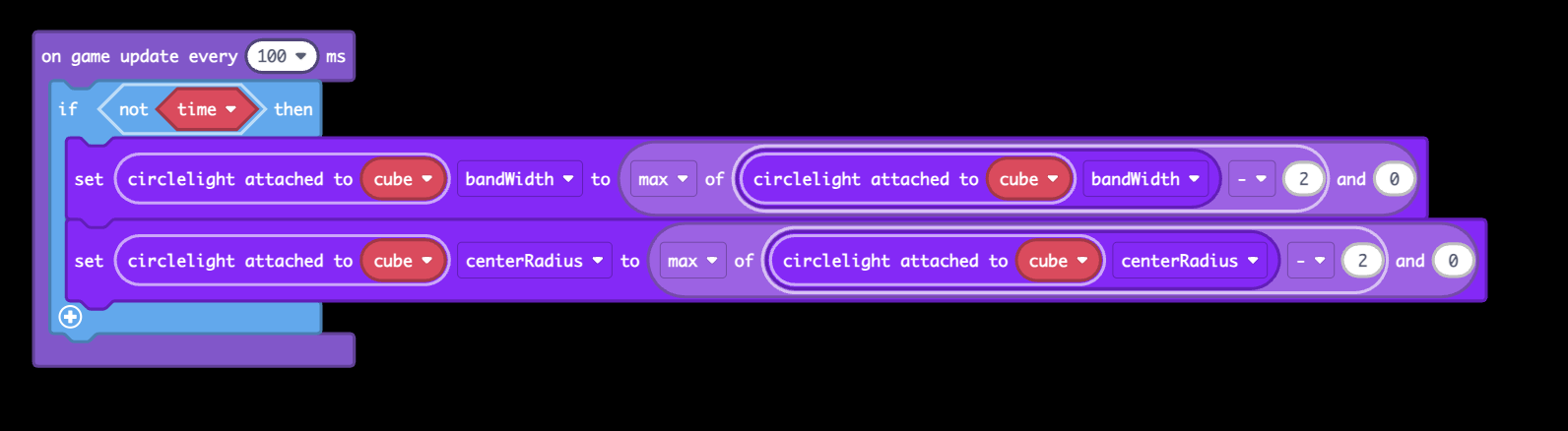
The lag is happening because you set your circle size REALLYY big, so you’ll want to make it smaller to avoid that. You could just make the centerRadius big and leave the bandWidth small to cover the whole screen and still avoid this issue.
3 Likes
I like seed 0 since it does that too!
1 Like
hmm, still not working?
Is there a way to make a sprite or a section of the screen ignore the lighting effects?
Im making a game and it has some ui the player needs to see. I did make my own lighting system and one with a shader extension but they are both realy laggy, so my only current option is making every pixel eighter normal or black with nothing in between, but that looks much worse.
Btw I love this extension, its amazing how smoothly it runs.
2 Likes
I don’t remember what z level I have it run at, but if you move your UI to a z level that is high enough it will render after the shader effect is applied.
This extension runs super fast because it is using some c++ functions that the mods built into Makecode specifically for making shaders run faster! It’s very nice. The old Lantern and Multilights extensions have not updated to use these functions yet.
I think I still haven’t updated the flashlights part of this extension to use those yet… a project for next time I’m bored I suppose.
3 Likes
Hey Woof woof, do you think you can make it so you can have the circlelight or just the whole screen be a certain light level?
For Retro Phantom, I got a light level that I really like and would want to use it for the Power outage sequence.
1 Like
I am unfortunately quite busy, but yes probably this is an easy change to make. I’ll see what I can do given the time I have and how often I forget to do stuff like this.
2 Likes