Let me know if the link doesn’t work, I’m not good with links
My game errors every time I open a level, and the debugger is being very unspecific of what isn’t working. What is the fix?
2 Likes
- line 52 - the sound effect made it lag
- lines 754-756 - error (Textsprite was null)
- line 498 (originally 600) - because of lag, Text_sprite was never loaded. It also tried to convert itself to text.
also, doing "Score: " + Score is actually the same as "Score" + convertToText(Score)
1 Like
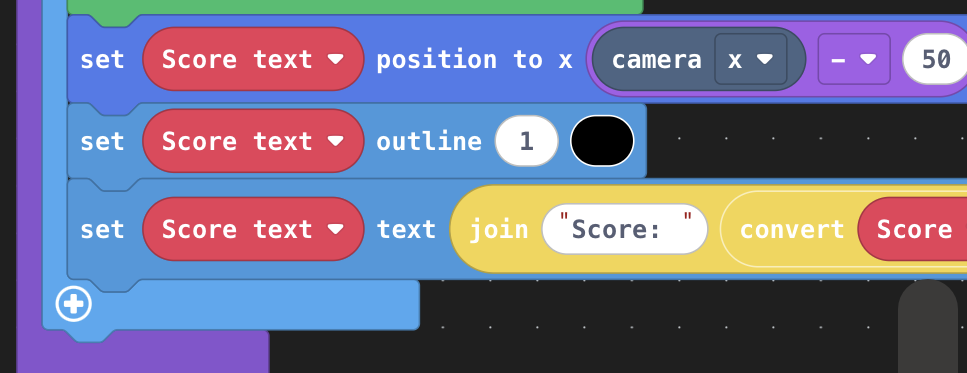
It appears that it’s because of these three blocks present in an in game update.
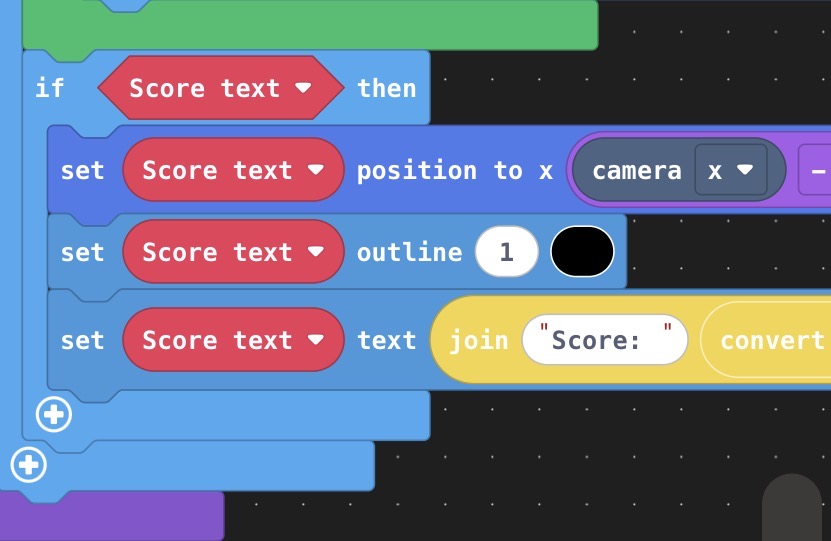
These blocks are being run before the scoretext sprite is created, therefore it throws an error because there is nothing to edit.
To fix this you can check if the sprite is defined in the first place, like this:
Hope this helps.
2 Likes
First off, welcome back  and that front page art is SO CUTE!!
  I love how you draw cats!
Here’s how I debugged this:
- The debugger is giving the error ‘Expected type Sprite but recieved type Null’: This means that somewhere the code is trying to use a sprite variable that hasn’t been defined yet (or was defined and then destroyed).
- If you scroll down to the bottom of the debug menu, it lists the line of code that caused the error at line 673.
- that line reads ‘Score_text.setPosition(scene.cameraProperty(CameraProperty.X) - 50, scene.cameraProperty(CameraProperty.Y) - 50)’
- The only sprite in that line of code is ‘Score_text’, a textsprite that is having its position set. So it must be the sprite that is null! We just have to find where in the code its either not being defined or is being destroyed.
- Here’s a breakdown of everything Score_text does in order:
- It is initialized as a new ‘null’ sprite
- When the function ‘load level’ runs, it is initialized as a textsprite, but as a clone of itself (so it is still null)
- When the game is running and ‘started’ is true, its position and other properties are updated (this is where we’re having the error)
- So, the sprite is created as ‘null’ and load level fails to give it a value.
- Therefore, the fix to this problem is to change the line in load level from ‘Score_text = textsprite.create("Score: " + convertToText(Score_text))’ to ‘Score_text = textsprite.create("Score: " + convertToText(Score))’: Now, the text sprite is initialized before the game tries to modify it so the error is fixed!
- As I’ve just seen @VoxelMaster64 point out, you also have to get rid of some of the lag to make sure the code doesn’t run too early or late.
5 Likes