ok so if you can already do this I’m sorry but I was kinda convinced you could not but got it to work (with a little help from Google Gemini) now I’m not the best at creating a help GitHub repo but I’ll try to make one to give the right files but here are the steps
1.download the elf I used https://vegz78.github.io/McAirpos/index2
2.download the 32-bit os I now I used a Chromebook installing the imager using Linux and running it by typing “sudo rpi-imager” in the terminal
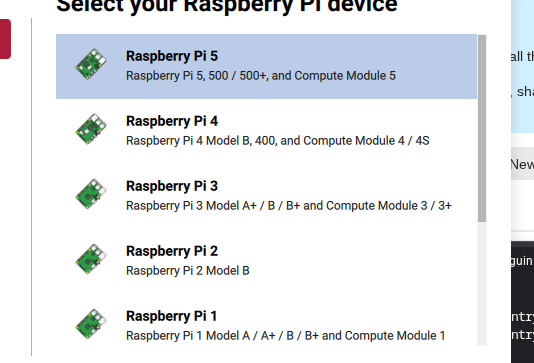
Screenshot 2026-03-05 8.23.42 AM534×363 47.8 KB

Screenshot 2026-03-05 8.23.50 AM534×363 51.2 KB
3.create folder by typing on the tv terminal or the Chromebook or whatever your using terminal and type “sudo mkdir /sd” and then type “sudo nano /sd/arcade.cfg” now you I think should already have this so you probably can skip this but to see if you have it type ls “-l /sd/arcade.cfg” If it says "No such file or directory you missed the sudo mkdir /sd and sudo nano /sd/arcade.cfg
4.now in order to run the game and unlock the keyboard I used a USB keyboard you have to type nano /sd/arcade.cfg you will be be in a editor put this in it

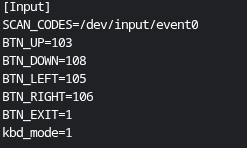
5.craete a named say “myGame.sh” by typing “nano myGame.sh” and put this in it

and make the arcade-pokemon.elf be the name of your game I used this https://arcade.makecode.com/S86054-26885-01958-76304
6.you need to get the data from your game so put a file called “converter.py” and put this in it
import osimport glob

def setup_cartridge():

#1. Find the game file (any .elf)

elf_files = glob.glob(“*.elf”)if not elf_files:print(“Error: No game (.elf) found on this cartridge!”)return
game_name = elf_files[0]
print(f"Preparing cartridge for: {game_name}")

# 2. Force permissions
os.system(f"chmod +x {game_name}")

# 3. Create the boot script (The Bridge)
with open("boot.sh", "w") as f:
    f.write(f"#!/bin/bash\n")
    f.write(f"sleep 2\n") # Wait for Pi 5 graphics to wake up
    f.write(f"sudo ./{game_name} --hw rpi\n")

os.system("chmod +x boot.sh")
print("Cartridge is ready for Auto-Boot!")

setup_cartridge()
and then run “python3 converter.py” you should see “Cartridge is ready for Auto-Boot!” and to see if you have the file type “ls” you should see something like arcade-myGame.data if you do good
7.run “chmod +x myGame.sh” and “chmod +x arcade-myGame.elf”
8.next if you did everything correct type “./myGame.sh” and your game should run with the keyboard
“Note: If you don’t see the .data file (like arcade-myGame.data) right away, don’t panic! You have to run the game successfully one time first. Once the game starts, it ‘unpacks’ itself and creates that data file on your SD card automatically.”
also note this is a help kinda post so pls ask stuff if you need help because I don’t really think I told this very well but that’s just me
Mods I think this is fixed