In the game mode selection, when you click on Enemy Catalog and then go back, the game menu doesn’t work the way it’s expected to somehow. Can anyone make the menu go back to normal? Thanks
2 Likes
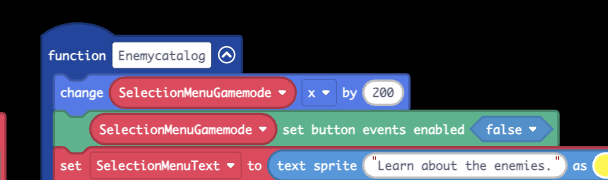
That “undestroy sprite” block doesn’t bring back the button handlers, only the sprite. The button handlers are the things that handle button presses, and they are separate from the sprite. That block probably shouldn’t be used on anything other than the normal makecode sprites, and even then it’s not perfect. I would suggest just disabling the button presses for the menu, moving it off-screen, and then enabling button presses and moving it back on screen when you need to:

3 Likes
So, what do I have to do, exactly?
Replace the “destroy” and “undestroy” blocks with the ones in the screenshots! Should look just like the screenshots in the end.
2 Likes
Ok I got that. Now, when I leave the enemy catalog, I can’t seem to control the game mode menu. Can you fix that? Thanks
1 Like
Did you make sure to set button events back to true? You might be setting it to false again. If you can’t figure out the issue then update the link and let me know.
2 Likes