Thanks for taking the time to look through the code and ask such detailed questions!
English isn’t my first language, so I translate my answers so I could respond more accurately. I wanted to make sure I understood your questions correctly and explained the technical details clearly.
Also, my development versions do contain comments, but I remove them from the public builds. I ran into an issue where MakeCode share links would sometimes get removed when comments were left in the code, and I still don’t know exactly what triggers it. Since many of my development comments are also written in another language, I usually strip them before publishing.
1. Why do you use inline sprites instead of Assets?
I back up and switch between different versions of the game very often. By keeping the images directly in the code, I only need to save the whole JavaScript / TypeScript text to keep both the code and the matching art together. This also avoids situations where the code and Assets come from different versions.
I have a separate document where I edit and manage the art assets, so I’m not actually drawing them directly inside the img text. Assets are definitely easier to edit in MakeCode, but keeping the images in the code works better for the way I manage versions.

2. Why are there so many HudSystem namespaces?
They aren’t actually nine different HUD systems. It’s the same HudSystem split across multiple files.
I’ve been developing the whole project in modules. As the HUD got larger, I split different parts of it into separate files, such as the tutorial, life display, results screen, etc., but those files still use the same namespace HudSystem.
TypeScript merges namespaces with the same name, so to the rest of the game it’s still just one HudSystem, and I can keep calling everything through HudSystem.xxx().
I mainly do this because it makes things easier to work on. If I want to change one part of the HUD, I can just go to that file instead of searching through one huge HUD file. The module screenshot is basically how the whole project is organized.
3. How different is the performance between drawing the bullets myself and using the normal Sprite system?
I made my own performance testing tool for this, and the difference is pretty noticeable.
LEFT: Current rendering system: 4,282 bullets, 45 FPS
RIGHT: Native Sprite system: 1,531 bullets, 17 FPS
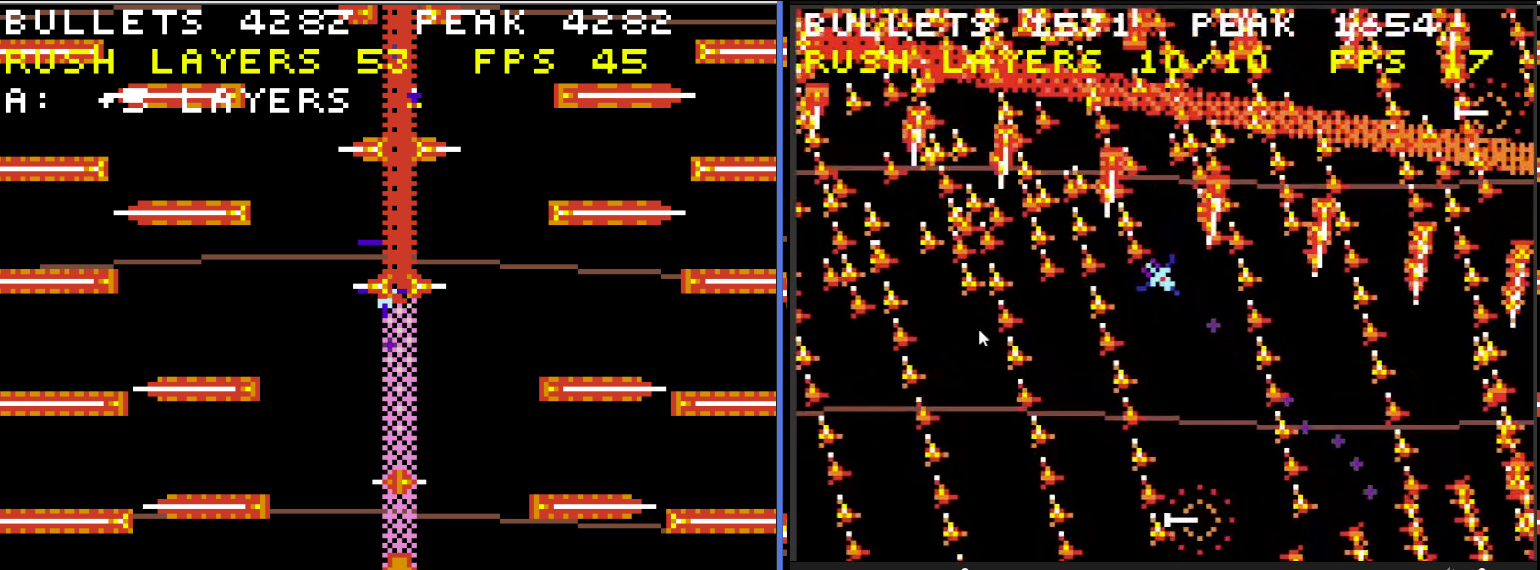
The RUSH Boss creates a lot of bullets during each dash. With the old approach, those attacks could make the game almost completely freeze. After switching to the current system, it became much better.
I also changed the collision system, not just the rendering. Collision checks are regional instead of running across the entire screen.
So when there are a lot of bullets, they aren’t all constantly doing full collision checks. Only bullets that enter a certain area around the player or shield go through the more precise collision detection. Bullets that are off-screen or far away from the player don’t waste as much performance on collision checks.
The main ideas are:
- Only draw bullets that are actually on screen
- Draw large numbers of bullets together
- Only do precise collision checks for bullets near the player
This works especially well when there are a lot of off-screen bullets. In one stress test, there were more than 15,000 bullets in total, and because most of them were outside the screen, the game could still run at around 25 FPS.

4. Why does the player have pre-drawn angles if you also have a rotate function?
Because rotating small pixel-art sprites sometimes produces images that don’t look very good, even if those bad frames only show up occasionally.
I also found that rotation could sometimes affect the player’s trail effect in strange ways. While rotating, the trail could develop jagged edges.
So for the player, I pre-draw the important directions. I only hand-draw about one quarter of them, and the rest are created by mirroring or rotating those images with tools.
I still use the rotate function for other objects where the exact pixel shape isn’t as important.
Thanks for the questions! I didn’t expect someone to look through the code this closely, so it was really interesting to answer them.