OH MY GOSH! This actually looks way cooler than mine!
I think this is what I wanted my semi-final version to look like.
This is really cool! Please keep working on this. We can both work on our own and we can compare and contrast in the end, but this is really good.
4 Likes
Thanks! I think when you add the AI to the lizard it will truly feel more alive! (also sorry for making something similar, I didn’t mean to…).
1 Like
So, I’ve been working on the rotation extension, trying to make the new blocks Luke suggested, and I ran into a problem. The logic I use for rotating an image changes the width and height as it rotates so the edges don’t get cut off. So, I also made it so the sprites change position as they change size, and the reason for this is because when you change the image’s actual size, it increases to the right and to the bottom.
The solution I came up with for this problem was adding a pixel margin, so they don’t have to change size.
I added two new blocks that are for rotating standalone images:
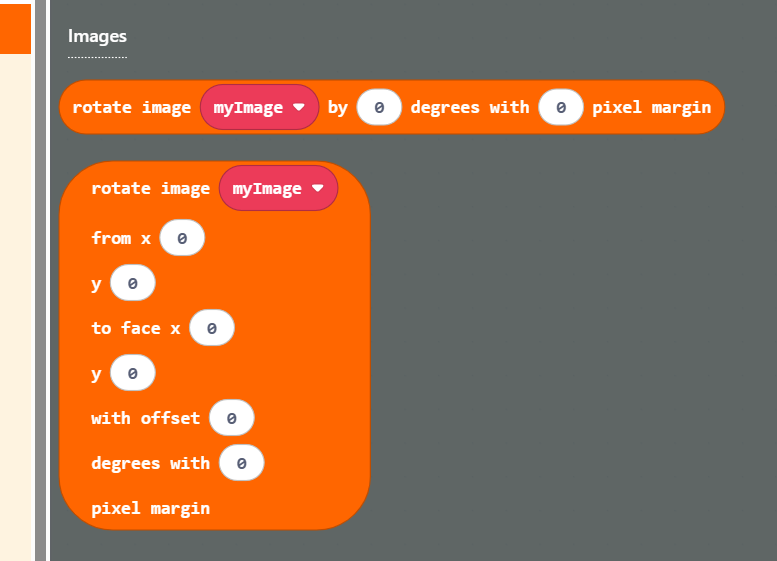
I also added categories to the toolbox.
Let me know what you guys think of these new blocks!
@miguelsanto17598-gli was saying earlier that this rotation extension has the same namespace as some other common extensions so I would like to rename the extension to “Sprite Rotation” (spriteRotation in the namespace). Are you all okay with me changing it? I know it might glitch your projects (and you might have to go back through your code to change it to the new one if you use java).
4 Likes
ah nice, i always make the base asset have a border but this is a nice touch
2 Likes
can you please make a cat i know its a big ask but it will be a big favour please
please
@BLADEr can you show me your rotation extension?
wait. have patience its been like a few hours it will take some time to be done
1 Like
i know i just wanted to add another please
Sorry everybody, I’ve been busy with marching band.
Here is the link to the rotation extension, @RoboVacDev.
@coppercode, sorry I didn’t get to your message sooner. I can try to make a procedurally animated cat, I’m sure it would be a fun project for me! (you’re talking about a different project, right?)
5 Likes
yes i am talking about you making a new project to make a procedural animated cat and thank you for taking up the challenge because i tried but failed miserably so good luck
1 Like
I will get on that, @coppercode! Thanks for the idea.
Like @TheEarth said recently, I personally find it easier to actually finish a project when others are wanting to see it.
2 Likes
ok and thank you for taking up the challenge because I’m are really big fan of you and what you do so I’m so excited that it’s you working on this thank you so much
1 Like
rain world?
2 Likes
rain world?
Five Pebbles?
2 Likes
It uses the same logic to animate as Rain World, yes!
I love Rain World, and I really like the new Watcher version!
Rain World was the thing that really got me interested in Procedural animation, and now, I want all my games to include Procedural animation!
4 Likes
On Monday I’m going to make a post about the math for each of these extensions, so that you guys can better understand what they can be used for and how to use them at their fullest!
1 Like
Ok. As promised, later than expected, here’s all the math and logic that goes into making these extensions! The reason for this is so you guys can get a better understanding of how to use the extensions at their fullest, and I hope all this in general is useful to some of you!
Softbodies
This extension is used for primarily 1-demensional rope physics.
The main creation block makes an array from an already existing sprite, meaning it duplicates that sprite. that’s why when you create a new rope, the source sprite is still left behind.
In this extension there are two different types of rendering:
- Fill rendering
- Takes the width of each segment image and connects all the edges to make a unified outline-fill.
- Line Rendering
- Simply draws lines between each segment
Both rendering styles can be used on sprite’s image or standalone image. Using the block that renders on a sprite’s image is useful because maybe there’s camera movement involved and we want the canvas to the given softbody to move with it.
The math I use for keeping the segments together is Verlet Integration, Hooke’s Law springs, and simple constrain projection. I have 4 blocks for changing the spring forces currently maybe to add more in the future:
- Set Max Stretch
- Changes how far apart each segment is allowed to be from each other
- Set Segment Max Velocity
- Changes how fast segments are allowed to travel
- Set Spring Stiffness
- Changes how aggressive position error is corrected
- Set Damping
- Changes how fast the velocity is reduced
There are also a few blocks on query that make finding segments/softbodies easier.
And that’s it for this extension!
Inverse Kinematics
The type of integration I use for this extension is FABRIC (Forward And Backward Reaching Inverse Kinematics).
That link is a video, and I think it explains it pretty well.
Like the video said, the physics is iterative, meaning the position of each of the joints is calculated by the other joints’ positions, so no velocity here.
I’m planning on adding blocks for angle clamping.
I made this extension a while back and haven’t really touched it sense. I’m up to suggestions about this extension, what might be cool add-ons, what could be changed?
That’s it for this extension!
Ragdoll Physics
This extension is better if you want to get down to the structure of your softbody.
It’s like the softbody extension, it has similar math, but in this extension you make your own connections from sprites.
This is better for making 2-dimensional softbodies.
This extension is fairly new. I haven’t done really anything with it besides create the core idea.
In the near future, I will add blocks similar to that of the softbody extension (for changing the physics)
Although it’s like the softbody extension, there’s no way right now to define all the sprites that are connected to a given sprite; there’s no array’s involved as your making the single connections yourself.
That’s it!
Line Canvas
This extension basically makes a new image that stays in-between two sprites and draws a line between them.
What’s happening is a new canvas sprite is created and its width and height change based on the x and y differences between the two sprites you chose. Its width and height change every frame.
I might add more to this extension, but for right now it’s just a nice little function if you don’t want to do all the math for drawing a line from two points!
I meant to put this in my first post, but here’s the topic this extension really got out:
Link
Continuous Rotation
This extension is great for procedural animation in the image processing sense, because there’s no physics involved. This extension is for rotating images.
The reason I created this extension is because I wanted to animate a spinning effect on one of my sprites so that it would face another sprite. I was trying to make a game where you put skeletal bones together to make a creature of some kind. Although I didn’t end up finishing that game, I came up with a cool idea that had many applications.
I used this extension in one of my games for this topic, where I set each of the segments in a softbody to rotate continuously towards one another (which is totally doable!)
Along with being able to keep a sprite rotating towards another sprite, this extension can simply be used to rotate a standalone image towards a point.
That is it for this extension!
Thank you everybody for participating and I hope this post is of some use!
Also, I would love some suggestions to the IK extension and Ragdoll extension because they need some work! Any suggestions or thoughts are welcome as always.
5 Likes
Ok. I’ve been kind of busy for a while and am working on a bunch of different projects right now. I need to pace myself so I’m wondering what the community would like for me to finish first.
I’m currently working on new procedural animation extension right now! It’s an image mapping extension. It is a fairly new extension with some bugs but here’s a sneak peak:
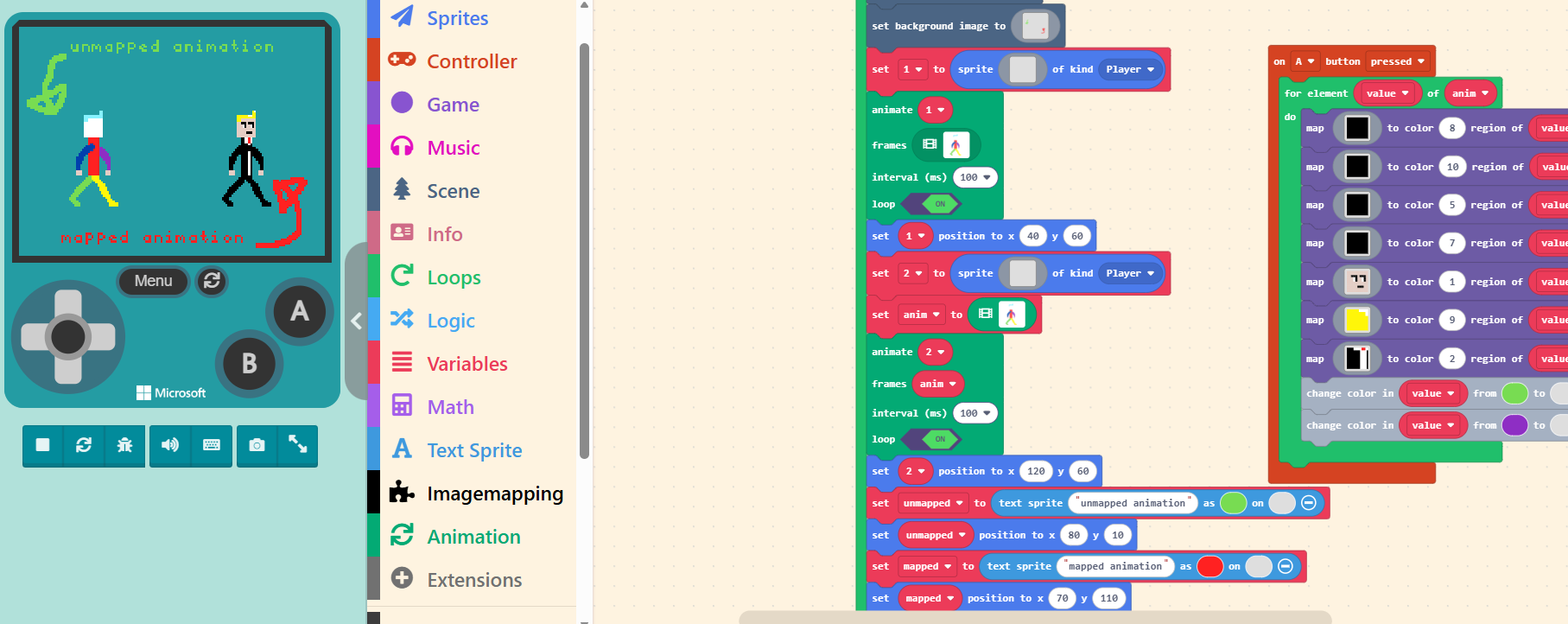
Going back to what I said earlier, here’s a poll for what you guys would like to see finished:
- Image Mapping Extension
- Ragdoll Extension
- IK Extension
- Softbody Doc Page (for help on block usage)
- Something Else (please comment)
0
voters
Don’t worry @coppercode, I haven’t forgotten about you procedurally animated cat!
Please let me know what you guys think and what you think I should finish by selecting a poll item.
Also, I thought I might ping this extension that @richard made for procedurally animated fire!
Thank you! And Happy Lunar New Year!
2 Likes
happy lunar new year to you blade and everyone else
1 Like