@richard its been 3 days, have you seen it yet? Actually if you’ve seen a post here (other than past posts), maybe just like it?Also I’m not like deeply annoyed (so don’t feel rushed), I’m just running out of things to do.
also what’s the best way to paste large binary files into makecode without crashing or lagging the editor? The only things I can think of right now are:
- hex`…`
- Buffer.fromUTF8(…)
- “…”
- […]
but there might be better ways to do so. The file size I’m expecting is 0.4 to 0.8 MB, which is very huge for makecode
hex is the way to do it. just put it in a file other than the one you’re working in, that’s what i do.
if you add a //% to your C++ function, a shim should automatically be generated for it.
however, there are restrictions:
- you can only pass primitive types (strings, booleans, numbers), arrays of primitive types, or select “special” types like buffers and images. classes are a no-go
- there is a maximum number of arguments. i don’t remember what it is off the top of my head
to get around the second issue, you can pack the arguments into arrays. see:
but of course the best choice is to just not have that many arguments if possible.
if the shim generation doesn’t seem to be working, you can also manually shim your function like so:
just declare a function with the same signature in typescript and add the //% shim="whatever" annotation to it.
4 Likes
@richard how did i never see sim/music.ts???
so if I want pcm sampling, is the process something like this:
music.playPcm(myHexBuffer)
soundEffect.ts:
namespace music {
	export function playPCM(buf: Buffer, format: PCMFormat) {
		quePCM(buf, format as number)
	}

	//% shim=music::quePCM
	function quePCM(buf: Buffer, format: number) { }
}
music.ts:
namespace pxsim.music {
	function quePCM(buf: Buffer, format: number) {
		// somehow I que the instructions but I don't know how
	}
}
melody.cpp:
namespace music {

//%
void WSynthesizer::fillsamples() {
	// do both pcm and normal wave filling in here. I think I fill some of an array with sound, I think it was called "d".
}

//%
void quePCM(buf: Buffer, format: number) /*runs on hardware*/ {
	// do something similar to pxsim.music.quePCM
}

}
I’m probably missing something or have a wrong idea
yup, that looks about right
@richard I have done that before, (https://arcade.makecode.com/S99039-28239-13469-64746) and it still crashed makecode even when inside main.ts. Maybe i should paste it last? Also, i have 286 KB of data from an opus file.
that’s way too big. i don’t think your goal should be to import entire songs, just short samples
2 Likes
@richard, is the sound in the browser ever being filled using c++? Or does it use typescript the whole way?
C++ never runs in the browser
2 Likes
@richard, inside pxt-common-packages\libs\mixer\soundEffect.ts i have:
    //% shim=music::queuePCMSound
    export function queuePCMSound(buf: Buffer, sampleRate: number) { }

    //% shim=music::startPCMSoundPlayback
    export function startPCMSoundPlayback(volume: number) { }
and in pxt-common-packages\libs\mixer\sim\music.ts i have:
    let pendingPCMBuffer: RefBuffer | undefined = undefined;
    let pendingSampleRate: number = 11025;

    export function queuePCMSound(buf: RefBuffer, sampleRate: number) {
        pendingPCMBuffer = buf;
        pendingSampleRate = sampleRate;
    }

    export function startPCMSoundPlayback(volume: number = 0.3) {
        // If nothing is in the queue, do nothing
        if (!pendingPCMBuffer) return;

        // Convert the raw bytes into an array of 16-bit signed integers
        const int16Samples = new Int16Array(pendingPCMBuffer.data.buffer);
        let position = 0;
        const chunkSize = 512;

        // Start streaming through the AudioContextManager you found!
        AudioContextManager.playPCMBufferStreamAsync(() => {
            // If we hit the end of the sound array, return undefined to stop the stream
            if (position >= int16Samples.length) {
                pendingPCMBuffer = undefined; // Clear the queue when done
                return undefined;
            }

            // Create a temporary chunk array for this audio frame
            const arr = new Float32Array(chunkSize);
            for (let i = 0; i < chunkSize; i++) {
                if (position < int16Samples.length) {
                    // Map 16-bit hardware signed integers (-32768 to 32767) to Web Audio Floats (-1.0 to 1.0)
                    arr[i] = int16Samples[position] / 32768.0;
                    position++;
                } else {
                    arr[i] = 0; // Silence padding if we run out mid-chunk
                }
            }
            return arr;
        }, pendingSampleRate, volume);
    }
For some reason, it is not finding the pxsim functions:
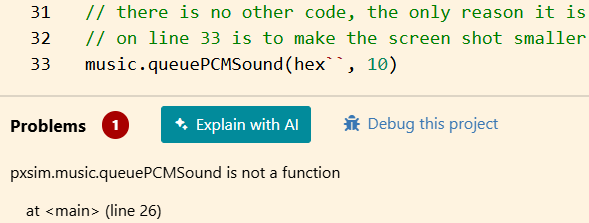
im guessing its not compiling sim\music.ts though i dont know how to make it
1 Like
ah, right, you can’t do sim work locally. the one closed-source part of pxt-arcade is the sim.
but you can fix this by moving the sim code into pxt/pxtsim/sound/
3 Likes
@richard if I make a change inpxt, would I have to run more commands than just pxt serve?
1 Like
@richard if I do import a whole song, would it work better if I imported the data into a github page, then load it like that? I think that would require to run the Sim inside github but idk how to do that
1 Like
you need to rebuild pxt. run this command from within the pxt repo:
gulp -n
that should rebuild all the relevant parts.
as for your other question, not sure what you’re askin’. what do you mean by importing a song? import an MP3? import a midi file? import a makecode song?
2 Likes
well import an anything, like for example, a 3 MB buffer of an mp3 file which obviously would crash makecode. I would think that loading it in github would allow more memory to be loaded.
1 Like
alright, there’s a lot to unpack here…
so yes, loading a 3MB file in our text editor would probably cause something to hang. it’s not designed to handle files that large, plus converting a 3 MB file into a text representation is going to make it significantly larger since text is an inefficient way to store binary data.
if you were to do this, i would add it to the project as a JRES file, which is a JSON file that you’ve probably seen in your projects where you can encode binary data in base64. you still won’t want to open that file in the text editor, but this at least means you can keep the binary data out of your source files.
to declare a buffer in a JRES file, you define it like this:
{
    "*": {
        "mimeType": "image/x-mkcd-f4",
        "dataEncoding": "base64",
        "namespace": "custom"
    },
    "test": {
        "id": "custom.test",
        "data": ""
    }
}
note that the “*” entry here sets the namespace to be “custom”. the actual item is declared in the “test” entry. the “id” field here is the namespace plus the name, so “custom.test”. in the actual file, you’d want to replace the “data” entry with a base64 encoded string that contains the binary data
to reference that data in your project, you declare a variable like this:
namespace custom {
    //% jres
    export const test = hex``
}
that hex buffer is intentionally left empty, when makecode compiles this program it will replace the contents of it with the decoded contents of the data field in that JRES file. note that the namespace and constant name have to match the values in the JRES file (“custom.test”).
so let’s do an end-to-end example real quick. say i want my JRES to include this data:
[ 72, 101, 108, 108, 111, 32, 87, 111, 114, 108, 100 ]
first, i need to convert that into a base64 encoded string. you can do this with a little snippet of javascript:
// note this snippet is NOT makecode javascript, it's plain-old regular javascript
// you can run in a browser. makecode does not have a btoa function
function toBase64(values) {
    let binaryString = "";
    for (const value of values) {
        binaryString += String.fromCharCode(value);
    }
    return btoa(binaryString);
}
that data encoded as base64 looks like this:
SGVsbG8gV29ybGQ=
so my jres file would look like this:
{
    "*": {
        "mimeType": "image/x-mkcd-f4",
        "dataEncoding": "base64",
        "namespace": "custom"
    },
    "myValue": {
        "id": "custom.myValue",
        "data": "SGVsbG8gV29ybGQ="
    }
}
and my typescript file looks like this:
namespace custom {
    //% jres
    export const myValue = hex``;
}

let res = "["
for (let i = 0; i < custom.myValue.length; i++) {
    res += custom.myValue[i] + ", "
}
res = res.slice(0, -2) + "]"
console.log(res) // prints [72, 101, 108, 108, 111, 32, 87, 111, 114, 108, 100]
if you try doing this in the editor, you might need to refresh the page after editing your jres file.
4 Likes
What command line do you use @richard?
Also, this might be interesting.
My Edits
pxt-common-packages\libs\mixer\soundEffect.ts (makecode javascript)
    //% shim=music::add
    function add(a: number, b: number) { }

    export function addTwo(a: number, b: number) {
        if (!a) a = 0;
        if (!b) b = 0;

        return add(a, b);
    }
pxt\pxtsim\sound\audioContextManager.ts (actual sim file)
    export function add(a: number, b: number) {
        return a + b;
    }
pxt-common-packages\libs\mixer\melody.cpp (just in case)
//%
int add(int a, int b) {
    return a + b;
}
I ran these:
cd C:\Users\...\pxt
npx gulp
cd ..\pxt-arcade
pxt serve --local
but those still gave me pxsim.music.add is not a function. I decided to check the console in devTools, expected nothing, and foung an interesting error:
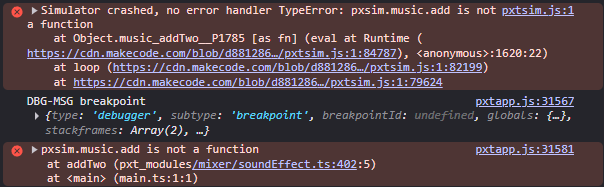
expanding DBG-MSG breakpoint gave me:
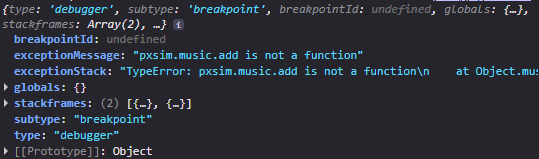
and exceptionStack is:
TypeError: pxsim.music.add is not a function
    at Object.music_addTwo__P1785 [as fn] (eval at Runtime (https://cdn.makecode.com/blob/d881286fc27642cf780785a76ca9229565860cc6/pxtsim.js:1:84787), <anonymous>:1620:22)
    at loop (https://cdn.makecode.com/blob/d881286fc27642cf780785a76ca9229565860cc6/pxtsim.js:1:82199)
    at https://cdn.makecode.com/blob/d881286fc27642cf780785a76ca9229565860cc6/pxtsim.js:1:79624
Gemini claims that the browser is trying to find pxsim.music.add off the public code, not my local build. If you need to I can try to debug more
i use the windows terminal with bash on WSL.
sorry, it might not be possible for you to easily make this happen given that the sim in arcade is closed source. it’s possible to workaround that limitation, but i’m afraid i probably won’t have time to coach you through it right now
2 Likes
okay. Please tell me when you are ready! (and also maybe an estimate when but you dont have to)
Also, @richard, is it possible to shim a class (and/or its constructor), interface, or variable? Also, is there some way to include the pxsim code, using /// <reference path="...">
(also dont feel hurried)
@richard is it possible to make code run line by line? When makecode compiles code, it makes a switch loop (I guess I’ll call it), which makes code run really slow. I’m wondering, is it possible to make a function and/or code that gets ran without that?