i would like to see the blocks or lines of code used to make the demo project
3 Likes
you can just make the door a sprite and plae it on the tile it wont look as good but it works well
1 Like
could you please add floor tiles in? i mean someone did it so
1 Like
The reason why I didn’t enable the feature rendering floor, is it can’t work on consoles. But nowadays, seldom mentioned playing on console. This is such pity, make game on console is the most wonderful feature of Makecode Arcade. As more and more gamer played on sim, seams no body cares about how it works on console any more.
Alright, I will release it someday.
10 Likes
Hah, my favorite way to play the 3d games is on my meowbit! XD
2 Likes
thanks!
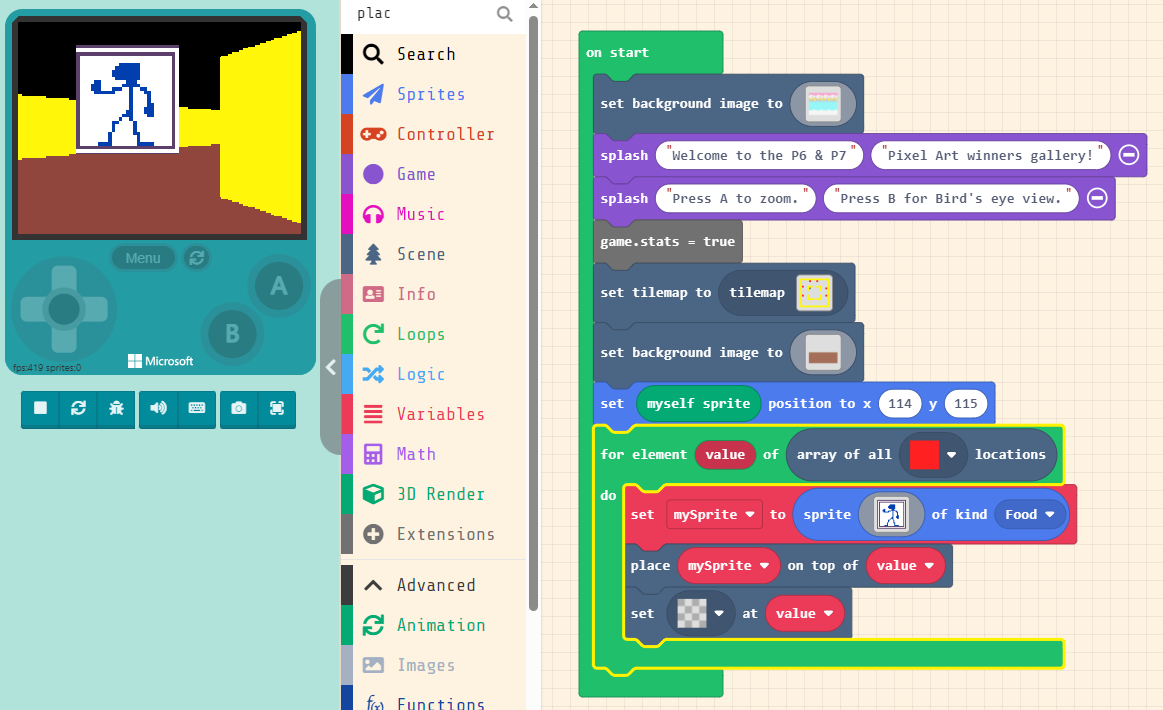

Seeking help!
I’m currently trying to make a 3D tilemap that shows 32x32 tiles on walls so I create a 3D gallery to move through. I’m restricted to Block code at the moment as I have Java experience at all (willing to learn just hoping to solve this without!).
I’m trying to emulate the Moskal 3D map model but without an array of pictures but instead adding different tile pictures all over. My closest attempt led me to replacing tiles (similar to Cutscene example) but it didn’t quite work out.
Could anyone help/advise? Thanks in advance!
2 Likes
Are you trying to set texture for walls?
Should set texture image on tiles, instead of any sprites on locations.
1 Like

Is there wall tiles in your tilemap?
first question is: did you make a tilemap?
i already put a tilemap and then its not working again and how i fix it now or i 
forget it i already fix it
Try this game that i made
 or
or 
3 Likes
any clue on how to be able to shoot a projectile from the z axis? everytime I try the projectile just doesnt exist, for example I mean the projectile shooting from the top of a sprite
1 Like
I see that in a new update of this extension tiles that are not walls do not render. Can you change this back because I need you to be able to walk through a wall in a part of my game
1 Like
I also think this should be added back, maybe as a simple boolean to render non-walls. As of right now the only way is to find an older project (one that was made before only walls were made visible) and edit off of that.
I agree render all non-transpatren tiles will give game more possibility. As repo history, “walls filter” is involved from 0.3.16, in which I tried the floor render. Floors have tiles, so only render walls as cube, non-walls tile as floor. This logic (render all non-transpatren tiles as cube) will not apply to floor version in future. (thought floor render didn’t be actived yet)
All makers using this extension, let me know if you have a proper logic?
how can you do this in blocks?
3 Likes
Why does the player have movement already attached to “myself sprite”, this makes it difficult to implement more flexible controls (strafing). I have been trying to code so that you can walk with WASD and turn the camera with the player 2 controls (IJKL). I set the built in block so that i 0 speed and 0 turn speed, but it clashes with the default controls, which I’m not able to remove (I’m not good in javascript or python)
5 Likes