Saving a 60*60 Tilemap

Hello community members,

For the next revision of my game, i’ve tried to add a saving system that saves 4 parallel arrays with information about the tilemap, however, i think the game runs out of memory before the level can be saved. I have seen this already being done but i only almost got it working.

I wanted to ask what i could try among, trying to save the information onto the settings by bits, use the existing array with tile images for loading so that the image array can be a number, or something else! Let me know what you think i should (or can) do.

1 Like

Have you tried saving it to a string? I have done this on VectorForge (V.Beta.1.2), But its only a 5x5. maybe you could try it.

1 Like

Interesting, though this is just very close to using the existing array I have to identify tile images when loading. It looks like a good idea though, as i could assign each tile to a letter or a number, and i doubt i would run out of characters to use. I will just try this first and see if the game handles it better.

1 Like

okay, so a few things here:

my actual advice would be to not do this; instead, store the changes to the tilemap instead of the entire things. unless you’re making a minecraft style game where every tile can be changed, this approach will likely be much, much more efficient.

with that being said, if you absolutely must save the entire tilemap to settings then here is how i would do it:

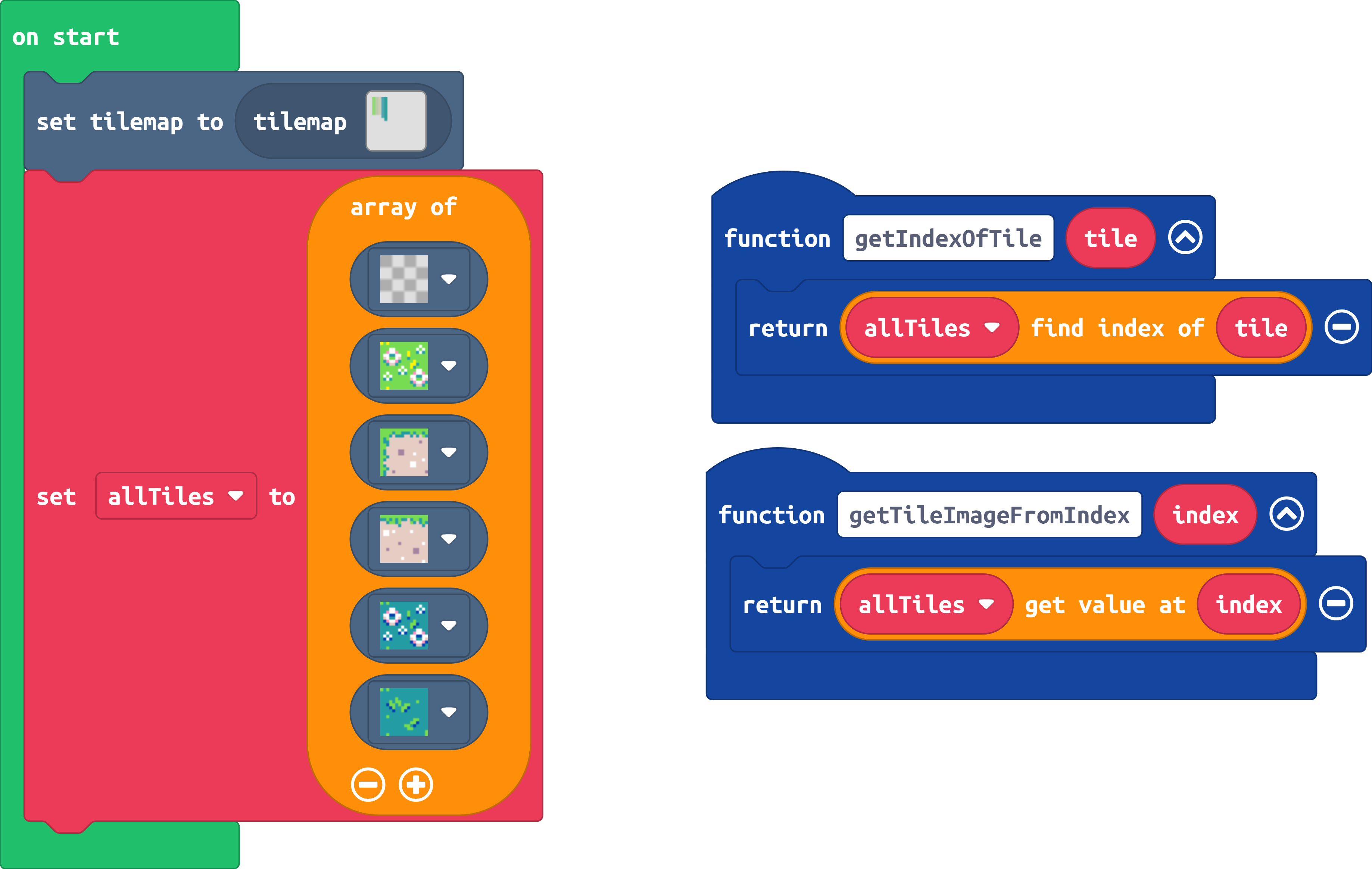
first, assign every tile in your tileset a number. for example, you could create one giant array called “allTiles” and use the index in that array as the number id for each tile.

then, when saving the tilemap you can save an array of numbers instead of an array of images (images stored with the better settings extension take up a LOT of storage space, so I would not recommend using that function).

the code would something like this:

3 Likes

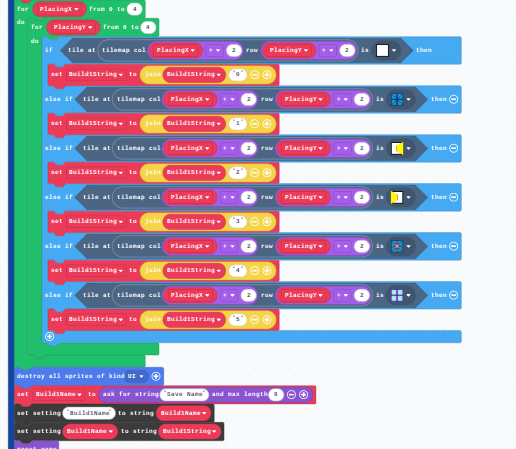
I did it, but it loads back weird and i don’t know how to fix it:

1 Like

Once it works, i’ll optimize it, I just got the general idea of what you meant with that.

1 Like

I have an extension that lets you load tilemaps from a number array, so combining Richard’s idea with that extension would make it a lot easier. Each number in the array correlates to the position of the image of that tile in the tile set array, so the number 0 is the transparent tile, etc etc.

Woofwoofcodes/pxt-tilemapgen

3 Likes

alright, i don’t really want to make an extension for this so @WoofWoof i gift this code to you:

function saveTilemap(name: string, tilemap: tiles.TileMapData) {
    settings.writeBuffer(name + "-data", (tilemap as any).data);
    saveImage(name + "-layers", (tilemap as any).layers);

    const tileset = tilemap.getTileset();
    const tileByteLength = byteHeight(4, tileset[0].height) * tileset[0].width + 8
    const tilesetByteLength = tileByteLength * tileset.length;

    const tilesetBuffer = control.createBuffer(tilesetByteLength + 1);
    tilesetBuffer[0] = tileset.length;

    for (let i = 0; i < tileset.length; i++) {
        const offset = 1 + i * tileByteLength;
        tilesetBuffer.write(offset, imageToBuffer(tileset[i]));
    }

    settings.writeBuffer(name + "-tileset", tilesetBuffer);
    settings.writeNumber(name + "-scale", tilemap.scale);
}

function readTilemap (name: string) {
    const tilesetBuffer = settings.readBuffer(name + "-tileset");
    const tilesetLength = tilesetBuffer[0]
    const tileByteLength = (tilesetBuffer.length - 1) / tilesetLength;

    const tileset: Image[] = [];
    for (let j = 0; j <= tilesetLength - 1; j++) {
        const offset = 1 + j * tileByteLength
        tileset.push(bufferToImage(tilesetBuffer.slice(offset, tileByteLength)))
    }
    return new tiles.TileMapData(
        settings.readBuffer(name + "-data"),
        readImage(name + "-layers"),
        tileset,
        settings.readNumber(name + "-scale")
    )
}


function saveImage (name: string, image: Image) {
    settings.writeBuffer(name, imageToBuffer(image));
}

function readImage (name: string) {
    return bufferToImage(settings.readBuffer(name))
}


function imageToBuffer(image: Image) {
    return f4EncodeImg(image.width, image.height, 4, (x, y) => image.getPixel(x, y))
}

function bufferToImage(buf: Buffer) {
    return image.ofBuffer(buf);
}

function f4EncodeImg(w: number, h: number, bpp: number, getPix: (x: number, y: number) => number) {
    const header = [
        0x87, bpp,
        w & 0xff, w >> 8,
        h & 0xff, h >> 8,
        0, 0
    ];

    const out = control.createBuffer(header.length + byteHeight(bpp, h) * w);

    for (let k = 0; k < header.length; k++) {
        out[k] = header[k];
    }

    let index = header.length;
    let ptr = 4
    let curr = 0
    let shift = 0

    let pushBits = (n: number) => {
        curr |= n << shift
        if (shift == 8 - bpp) {
            out[index] = curr;
            index++;
            ptr++
            curr = 0
            shift = 0
        } else {
            shift += bpp
        }
    }

    for (let l = 0; l < w; ++l) {
        for (let m = 0; m < h; ++m)
            pushBits(getPix(l, m))
        while (shift != 0)
            pushBits(0)
        if (bpp > 1) {
            while (ptr & 3)
                pushBits(0)
        }
    }

    return out
}

function byteHeight(bpp: number, height: number) {
    if (bpp == 1) {
        return (height + 7) >> 3
    } else {
        return ((height * 4 + 31) >> 5) << 2
    }
}

this is efficient code to read/write tilemaps and images to settings using buffers. enjoy!

7 Likes

@WoofWoof and @richard , thank you for your help! I ended up just using a number array, and the map loading back in a weird way was caused by the data being inverted for some reason. It works like a charm now, even if i had to make the Tilemap smaller:

Even though the game now ignores transparent tiles when saving, i am still afraid of making it bigger since if someone makes a really big thing the game will crash. You do need to first press “Clear saves” though, since you can’t safely check if something is undefined.

3 Likes

There is a block for checking if a setting exists as well as one for getting a list of all settings if you wanted to implement proper load checking and a menu of worlds to load.

2 Likes

sry, But May I ask What Extension 8x8 Tilemap Is?

1 Like

i completely missed it lol

It lets you make tilemaps where the tiles are half as big.

Import github.com/riknoll/small-tilemaps and Tilemap util.

I have updated WoofWoofCodes/pxt-tilemapGen with this code. You’ll have to import the actual settings extension if you want to do anything other than save/retrieve these tilemaps (for example deleting them) but it’s functional and stuff, so have fun!
2 Likes