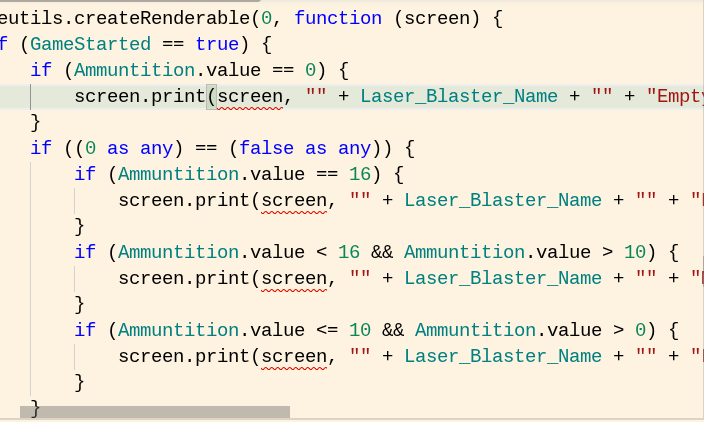
I am working on a new game called BattleBoi. I tried importing a template of @Octodemon’s first person shooter templates to my project with @neintoes’s Ray casting tweaks with cealing and floors. But I got this -
Why are you specifying a target to draw to when “screen” is already the target? You shouldn’t need that second “screen” inside the function call. The first input to the function should be the text. You can see this if you hover your cursor over the “print” function:
This is fundamentally incorrect, you are simply physically unable to make a mistake like this in Blocks. JavaScript has way better debugging. This code will 100% become grey blocks when converted, which won’t help at all.
No extension would make you do this, or allow it, as it is simply a dumb way for the function to work.
I’m pretty sure you’re trying to get the screen to print words, like it would in the output, which I’m pretty sure doesn’t work like that. What I would do is to just download the text sprite extension and create a new textsprite with the text you want.