3D voxel rendering engine

hex buffers aren’t really faster than normal arrays, they’re just more efficient in terms of code generation when declaring data in your project.

before i go into ways to improve efficiency of makecode projects, let me first give a warning to anyone who is reading this post in the future: you probably don’t need to follow any of this advice! unless you’re writing something that is extremely performance intensive (like a 3d/voxel engine), over optimizing your project will just leave you with a mess of unreadable code that you don’t enjoy working on. if your game is running slowly, look elsewhere for what might be causing issues before refactoring everything using the advice below!

with that out of the way, here are the big wins for improving performance:

  • always use classes instead of object literals, avoid casting to any, and avoid interfaces. all of these things require expensive string lookups when accessing properties. classes do not, and are much more efficient
  • always use the built in image functions instead of doing your own thing. if you’re calling setPixel in a loop somewhere, stop and ask yourself if you should be using fillRect, fillTriangle, or blit instead
  • use integer arithmetic instead of floating point wherever possible. this is an annoying one to deal with, so we have a bunch of helper functions in the Fx namespace that you can use to convert floating point numbers to fixed point numbers. if you want to see examples of this, i recommend checking out the physics engine (but be warned, it’s pretty gnarly). i recommend holding off on doing this one until you have things working, it really makes code harder to read and refactor
  • bitwise arithmetic is your friend. need to cut off the decimal part of a number? use num | 0 instead of Math.floor. need to divide by a power of 2? use right bitshifting. need to multiply by a power of 2? use left bitshifting. but be warned: any bitwise operation will convert the result into an integer, so dividing/multiplying with bitshifting is only useful when you want the result to be an integer.

now for your other question: if/else is not more efficient than switch or ternary expressions (e.g. expression ? ifTrue : ifFalse), they’re all basically the same. that being said, in general it is always best to avoid using any of these inside of loops!

for example, this code:

function togglePixels(left: number, top: number, width: number, height: number, on: boolean) {
    for (let x = 0; x < width; x++)
        for (let y = 0; y < height; y++) {
            if (on) screen.setPixel(left + x, top + y, 1)    // if statement inside loop
            else screen.setPixel(left + x, top + y, 0)
        }
    }
}

is less efficient than this code:

function togglePixels(left: number, top: number, width: number, height: number, on: boolean) {
    let color = 0;
    if (on) color = 1;    // if statement is outside loop

    for (let x = 0; x < width; x++)
        for (let y = 0; y < height; y++) {
            screen.setPixel(left + x, top + y, color)
        }
    }
}

and of course these are both less efficient than this code, because it uses the builtin image functions:

function togglePixels(left: number, top: number, width: number, height: number, on: boolean) {
    screen.fillRect(left, top, width, height, on ? 1 : 0)
}
4 Likes

a lot of that i have already started doing! Also, I should be using hex buffers, right? Because there are probably like 5 number arrays that are being indexed thousands of times per frame. Also, what about changing values in a buffer during runtime vs a number array? Lastly I would be grateful if there was a better way to get a half of a byte, so a singular hex character.

1 Like

You can make a function for these, but if you have a byte in a numeric variable, it’s pretty low-cost to get either the high nybble or the low nybble.

let myByte: number = 0xaf
let loNybble: number = myByte & 0xf
let hiNybble: number = myByte >> 4
game.splash(loNybble, hiNybble)
1 Like

hex buffers are more efficient in terms of space, but that doesn’t mean they’re much faster. but hey, don’t take my word for it: just try it out yourself and see which runs faster

and the easiest way to get/set half a byte is to use images! they’re basically buffers but each pixel is 4 bits

2 Likes

also, for my color thing, each color is a 3x3 tile. the screen I made a number[][], which obviously isn’t fast. you access a pixel through gpu.fb[x][y], and I think gpu.fb[x + y*w] is faster? Also, I would like it more if screen.setRows(x, buf) inputted a buffer of `134eab63e…` rather than `0103040e0a0b0e06030e…`, is there a way to do that? also, things like img`…` do the format I want but I don’t think you can pass in a variable. I would like that I could because it allows more compression, so any info would be helpful!

1 Like

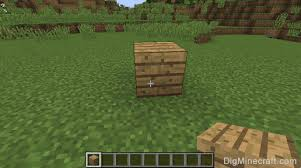
can you try to add tile block placing like minecraft?

what do you mean by tile block placing?

1 Like

Place a block.

1 Like

like this

1 Like

I thought I already added that, is it for the extension?

2 Likes

the reason setRows does that is because working with 1 byte at a time is faster than working with 4 bits at a time; computers are designed to use 8 bits as the lowest unit of data. when using 4 bits, the computer has to pack/unpack the data from each byte every time you write/read a number.

to make this more concrete, let’s say we were making a version of a buffer that used 4 bits per cell. the methods would look something like this:

class FourBitBuffer {
    private buf: Buffer;
    constructor(length: number) {
        this.buf = control.createBuffer(Math.ceil(length / 2));
    }

    setData(index: number, data: number) {
        if (index & 1) {
            this.buf[index >> 1] = (this.buf[index >> 1] & 0xf) | ((data & 0xf) << 4)
        }
        else {
            this.buf[index >> 1] = (this.buf[index >> 1] & 0xf0) | (data & 0xf)
        }
    }

    getData(index: number) {
       return (this.buf[index >> 1] >> ((index & 1) << 2)) & 0xf
    }
}

notice the number of operations we have to perform in setData and getData! it’s all because we need to pack our data into either the lower 4 bits or upper 4 bits of the byte depending on if our index is even or odd.

conversely, we can avoid all of that packing/unpacking if we just use 8 bits for each pixel.

this tradeoff is worth it when it comes to images, because on hardware memory is more expensive than computational power. however, on the computer it doesn’t matter. in fact, on computer our images are actually stored as 1 byte per pixel under the hood since it’s so much faster.

3 Likes

it is now scaled. Im not exactly going to continue with the scaling stuff, but i am going to try to engrain it into the fence

2 Likes

other questions I have for performance (no order):

  1. voxels[x][y][z] vs voxels[x + y*W + z*WH]
  2. return g(f(x), f(y), f(z)) vs
    const fX = f(x); const fY = f(y); const fZ = f(z); return g(fX, fY, fZ) (I think the second is faster but idk why)
  3. is myHexBuffer[n] a byte
  4. classes vs number arrays
  5. myArr.push() vs myArr.unshift()
  6. Buffer.create() vs control.createBuffer()
  7. myArr[n] vs myHexBuffer.getUInt8[n]
  8. what is faster for arrays
  9. how bad does it hurt performance to have a bigger call stack (calling more functions in functions)
  10. *2 vs <<2
  11. when should I use Fx and Fx8 (or just replace them with their insides for a smaller call stack (question 9))
  12. Math.round() vs Math.floor() vs Math.ceil() vs Math.trunc() vs |0
  13. how much does makecode’s different compiler effect certain things
  14. if a variable is constant, should it be let or const, or is there no difference?
  15. how much slower is a variable (e.g. function input/output) that is something like number | Fx8 than number
  16. best way to output multiple debug lines from a frame without lagging too much (too many console.log()s starts to lag)

I’m probably going to come up with more later but those are a some I can think of currently!

1 Like

oh wait just in case @richard (dont approve this post if Richard already saw the first one)

2 Likes

uh, let’s see:

  1. not sure which is faster! i doubt it makes a huge difference either way. go with whatever is easiest to use
  2. the first one is faster. declaring variables is slower because they need to be allocated
  3. yes, if you index a buffer it will return an integer where only the lowest 8 bits are set. similarly, setting a value in a buffer to a number (e.g. buffer[n] = 500) will chop off all but the lowest 8 bits
  4. i have no idea what you’re asking here
  5. in the browser, this doesn’t matter. on hardware, push is faster
  6. they are the same
  7. i believe the first is infitesimally faster. overoptimizing
  8. again, not sure what the question is
  9. recursion is always going to be slower than implementing things iteratively, but if you’re just talking about using functions in general then don’t worry about it. inlining everything will make your code unreadable and impossible to maintain. use functions
  10. i think you mean * 2 vs << 1, since rightshifting by 2 bits would actually be multiplying by 4, not 2. i’ve written about this before on the forum, but bitshifting is way faster than division and multiplication. however, it always converts the argument to an integer so you can’t use it with decimal numbers and it only works with powers of 2
  11. just use the functions. you’re definitely overoptimizing here
  12. again, you’re overoptimizing. but to answer the question: | 0 is the fastest of all of these, followed by Math.trunc followed by the other 3
  13. can you be more specific?
  14. there is no difference. const is purely for the programmer’s sake to prevent you from changing something that you think is constant, it has no impact on performance
  15. they are exactly the same. similarly to const, the Fx8 type is just to prevent the programmer from making mistakes by mixing decimal numbers and fixed point numbers. Fx8 is just a number
  16. console.log is always going to be slow, you can always try to batch them together. for example, if you were trying to log all the pixels in an image or 2d array, i would recommend constructing one string with newlines between each row and logging once instead of logging each row individually
3 Likes

4:

class Enemy {
	health: number
	defense: number
	...
let enemy: Enemy = [] // enemy.value

vs

let enemies: number[] = [] // enemies[value]

8: You don’t have to answer it, but basically different methods of handling arrays (e.g. question 5)

13: I keep hearing from AI that makecode compiles differently than common things like node.js, so some functions might be faster than others

there’s this one function that is called screenW*screenH times a frame: traceRay. there there is this other function called inside traceRay, called intersectVoxelFaces. depending on the conditions, intersectVoxelFaces will be called 1 or more times, and besides, both have loops inside them. So to me it’s not really over optimizing, it’s that there are loops inside loops that do complicated math inside them

Also, which is faster for ray tracing, setting pixels on the screen individually, or writing to a buffer then screen.setRows?

Also my intire engine runs when game.onPaint is ran, is that fine?

2 Likes

Can you add voxel sprites to extension?

if you mean like in Minecraft you have entities, I’m planning to do that eventually just not now.

1 Like

Exactly what I meant!!!

wait you were already…