So I have a few questions about extensions.
- How do you change what the icon for the extension looks like?
- How do you make a boolean block?
- How do you make a dropdown?
Not related to extensions but how do I make the volume go lower like generally? I tried
for (let index = 0; index < 4; index++) {

    volume += 1

    music.setVolume(volume)

    pause(100)

}
but it wouldn’t work. Any tips would be much appreciated!
Oh and I would include a share link but my wifi’s wonky right now
1 Like
1 there was a website and you have to use icon=
2 Use a return value and return a Boolean
3 Use an enum
3 Likes
I’m sorry I can’t be more helpful specifically but maybe https://makecode.com/playground can help with your block definitions
2 Likes
Easy:
1:
- Go to this website: Font Awesome Search
- Then, pick an icon and copy its unicode id (Ex: f2bd)
(NOTE: Must be I’m pretty sure v4 or less for the icon to be used)
- Then, at the top of a namespace of the extension, use //%icon= and after the equal sign, put \u and the unicode id
2:
It depends on what you mean by a “boolean block”
If you want a regular true or false statement, you’ll just have to set the parameter to use a boolean take-in.
If you want it to say something like on/off, you need to use a special block annotation. Check out the MakeCode PlayGround to see on how to do this and other useful extension tips
3:
This also depends on what you mean by a “dropdown.” I can’t really give you enough information since you need to specify what the dropdown should do; e.g., show something like picking a state, showing the sprite kind dropdown, an enum dropdown, etc.
4:
Also, your code does work, but if you’re playing like a song, you have to manually restart the song to hear the difference I’m pretty sure.
2 Likes
Also how to create an image? I tried i:Image but as a result I got:
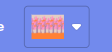
use //% image.shadow=“screen_image_picker” replace image with your param for the image
2 Likes