@richard Hey, so I’m trying to make a multiplayer game with this extension but for some reason only the first player can use ‘A’ with other players’s menus. Can you help fix this?
Here’s the link to it: https://makecode.com/_bTbDHMH40hKw
4 Likes
yeah, unfortunately this extension predates our multiplayer support. i’ll add this to my todo list
5 Likes
Thanks! A great extension by the way
1 Like
Hey folks! Big update to the mini menu extension today. If you want to try it out, please do so in a new project! Don’t update the extension in your existing project! I can’t guarantee it won’t break things. If you absolutely must, then please make a back up of your project first!
First off, multiplayer support! There is now a block in the controls section for setting which player controls a menu:

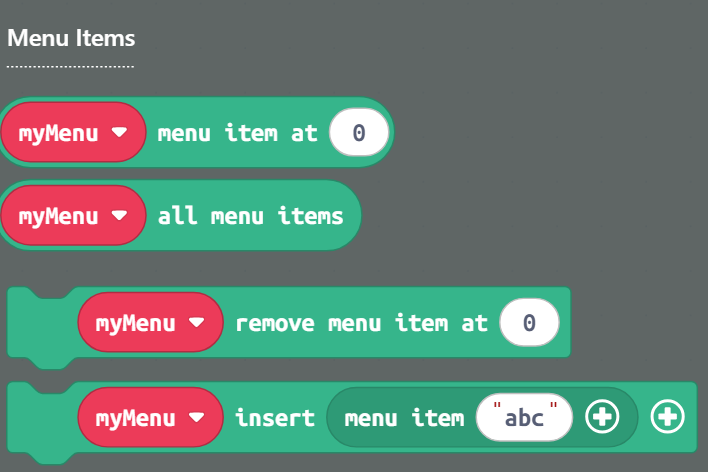
Secondly, you can now change the items in a menu after creating it! There are blocks for getting, removing, and inserting menu items:
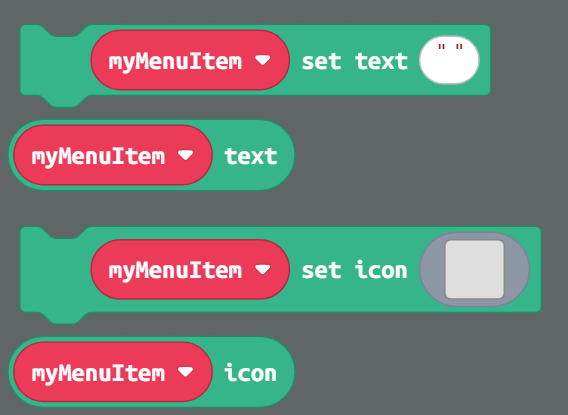
Thirdly, you can now edit menu items as well! New blocks for setting the text and icon of a menu item:
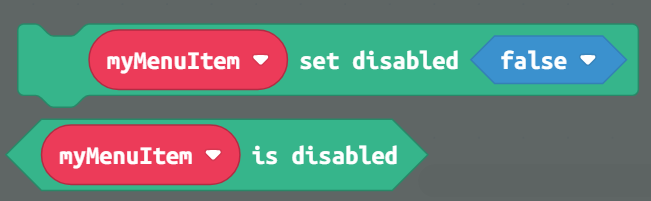
And finally, menu items can now be disabled! Disabled menu items cannot be selected and can be styled just like selected and default menu items:
You can override the selection behavior with the menu style block:

16 Likes
Omg this is amazing! Everything I have ever wanted from this extension. Would have made making the Dungeons 3D inventory a lot easier if it had come out sooner.
(Edit: this got approved in a total of three seconds. Wow.)
2 Likes
This changes everything… Especially multiplayer support.
2 Likes
Sorry to burst your bubble but Thirdly isn’t…
Wait nevermind it is. (that’s frickin weird man…)
3 Likes

Kinda scared to try my menu cursor extension with this, but this is so nice!!
4 Likes

A BLESSING FROM @RICHARD
5 Likes
wow. we have just seen a raree post by a creature once thought extinced. it is a wilde(i cant spell) @PixelDoodle
3 Likes
please Richard selectedimageindex pleaaaaaaaaaaaaaaaaaaaaaaaaaaaaase
2 Likes
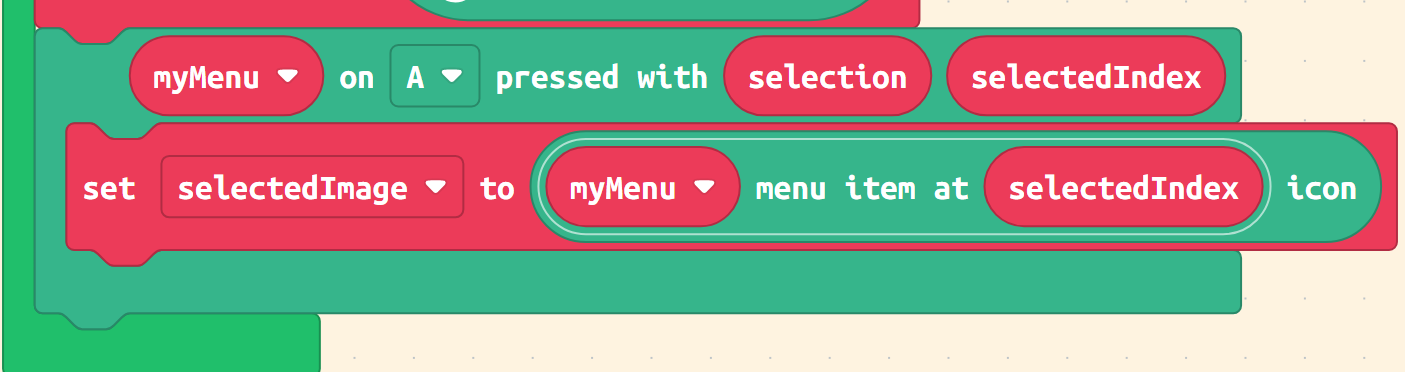
6 Likes
oh I feel really stupid now lol
3 Likes
Thank you so much, this update is really useful! Now my project can go on!
1 Like
Hey @richard can you update the mini menu for me? I really want this new update but can’t really understand how to do it. Even with a backup project, code still breaks anyways. Thanks!
here ya go: https://makecode.com/_DogJ4a0J55Ve
4 Likes
TYSM, @richard!
4 Likes
@richard I use this custom block all the time to make it easier to give settings to menus when I’m using multiple menus, and I find myself searching for this thread every time. Is it possible to get this added as a block in the mini menu extension?
1 Like
it shouldn’t be needed with the most recent version of the minimenu extension! i no longer surface the MenuSprite type, everything is just a Sprite now. don’t update the extension in your existing project though; i can’t guarantee it won’t break anything. still, shouldn’t be a problem in new projects
3 Likes