Hey all, back again with another discussion on a common pattern. This time I’ll focus on timing and a “simple” way to make your hero character hit enemies while swinging but vulnerable while not.
Like always there are many ways to solve the same problem, for me I try to solve everything without extensions. It’s easier to teach when you don’t have to explain how to find, import and debug external extensions.
How do I make my character hit an enemy!
One of the most basic interactions in any game, we have an “attack” motion that we want our hero do to. During this attack motion we want to be able to kill the enemies. But if we are not in the attack motion we should get hit by the same enemies.
The overall plan is a “state machine” which basically puts things in a game into specific states, each state can transition from one to the other. That’s a fancy way of saying “we need a variable to tell us what state the hero is in and change that when attacking”.
MakeCode Arcade gives us a great “sprite kind” that we can use for this state machine variable.
1. Player type = can be hit by enemies
2. Player swings sword
3. Set the player type to "projectile"
4. If projectile intersects enemey = kill enemy
5. After sword swing is done, set back to Player type
The effect is that the player can be hit and killed by the enemy unless they are swinging their sword:
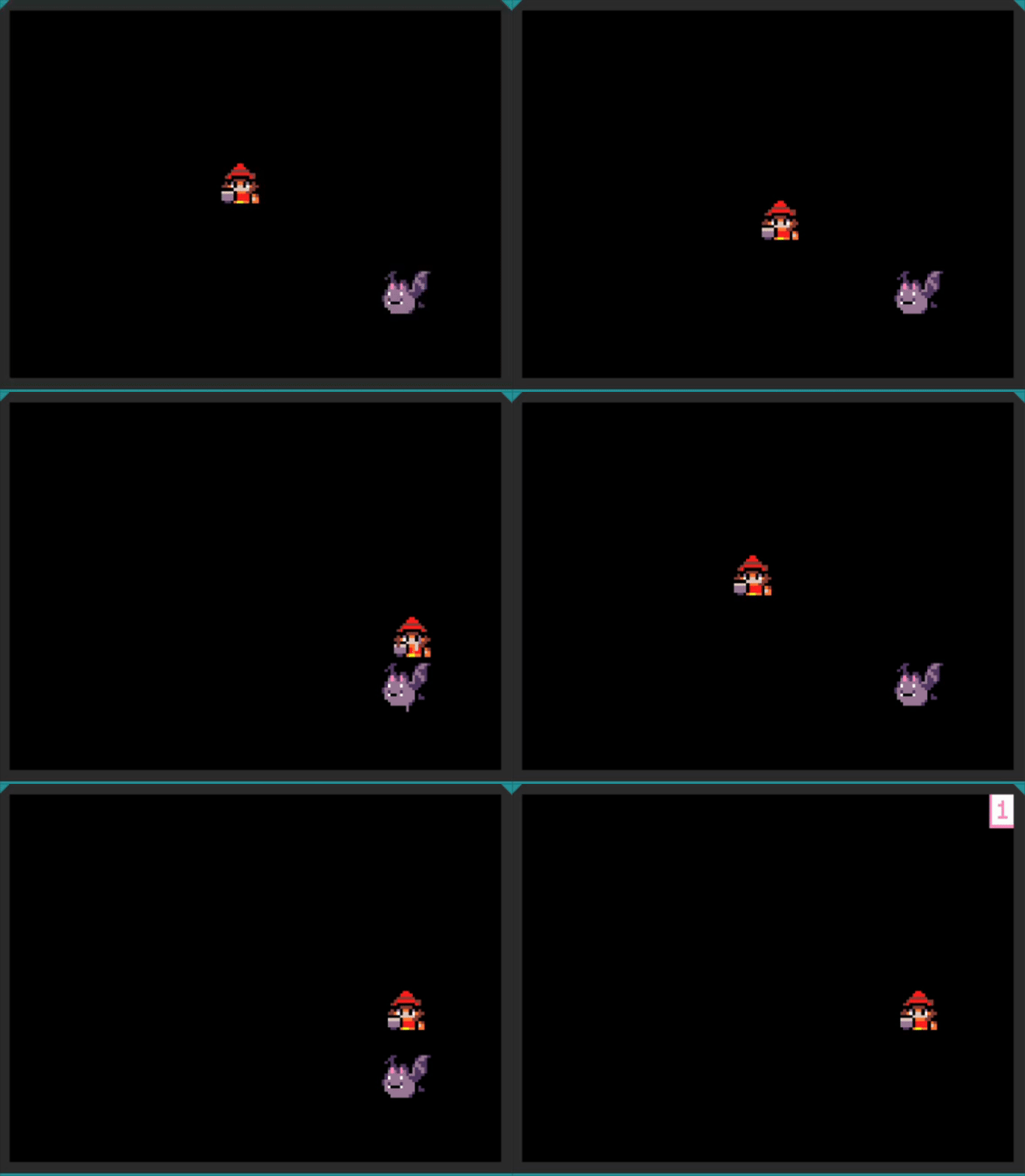
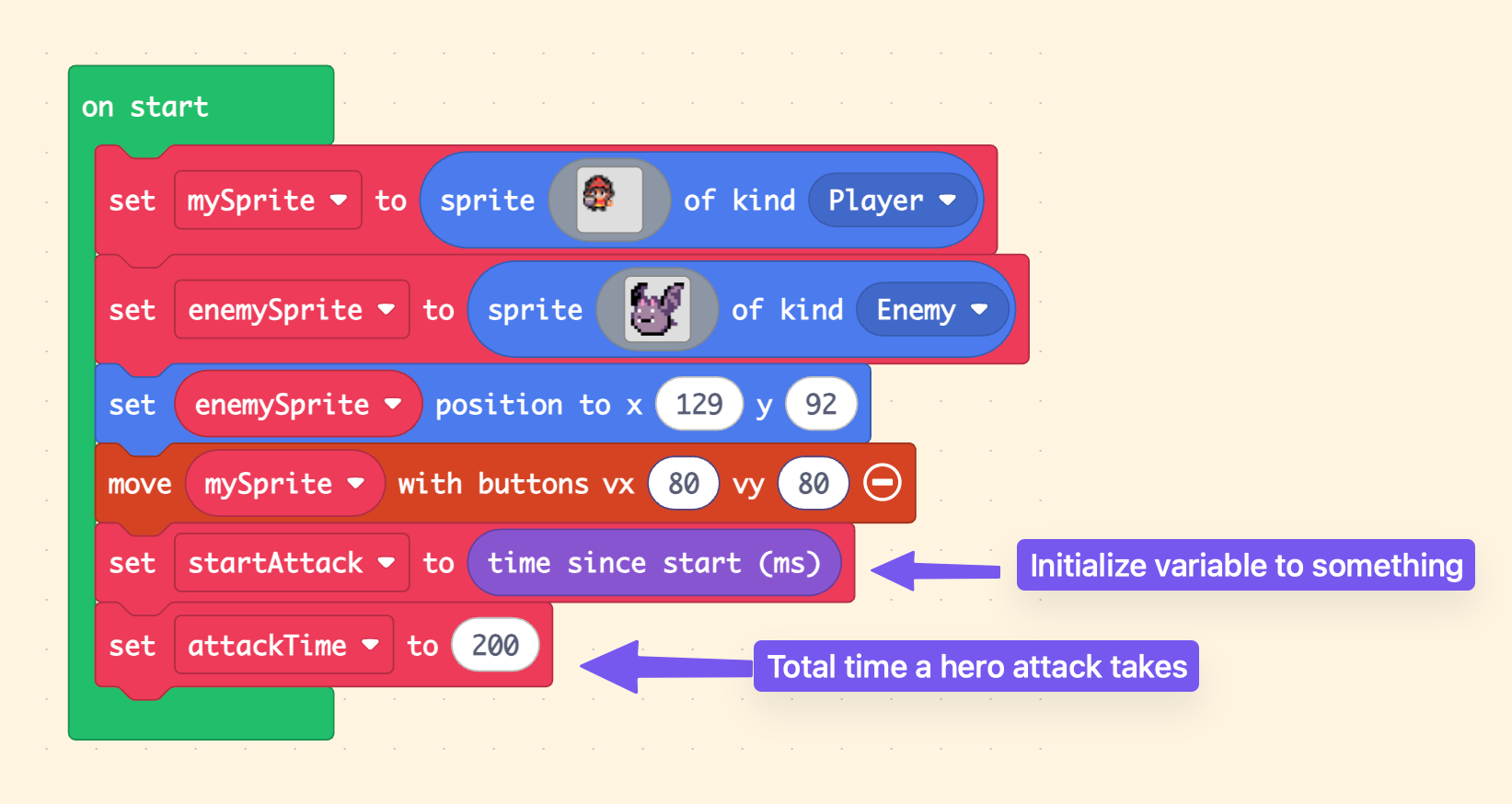
Setup
In our start we have to initialize some variables, one of the key variables is “how long do we want our attack to last”. The “startAttack” is just initialized here, we will use it later.
Projectiles Kill Enemies, Enemies Hurt Players
Getting some of the baseline events happening, we want to make Projectile types hurt Player types. And Enemy types hurt Player types. This allows us to get hurt but also kill enemies when attacking.

Perform the Attack
Check out this code: THIS WILL NOT WORK. The reason is the animation doesn’t stop the flow of code. The kind will instantly be put back to Player and you’ll see that your swing doesn’t actually kill the enemy!
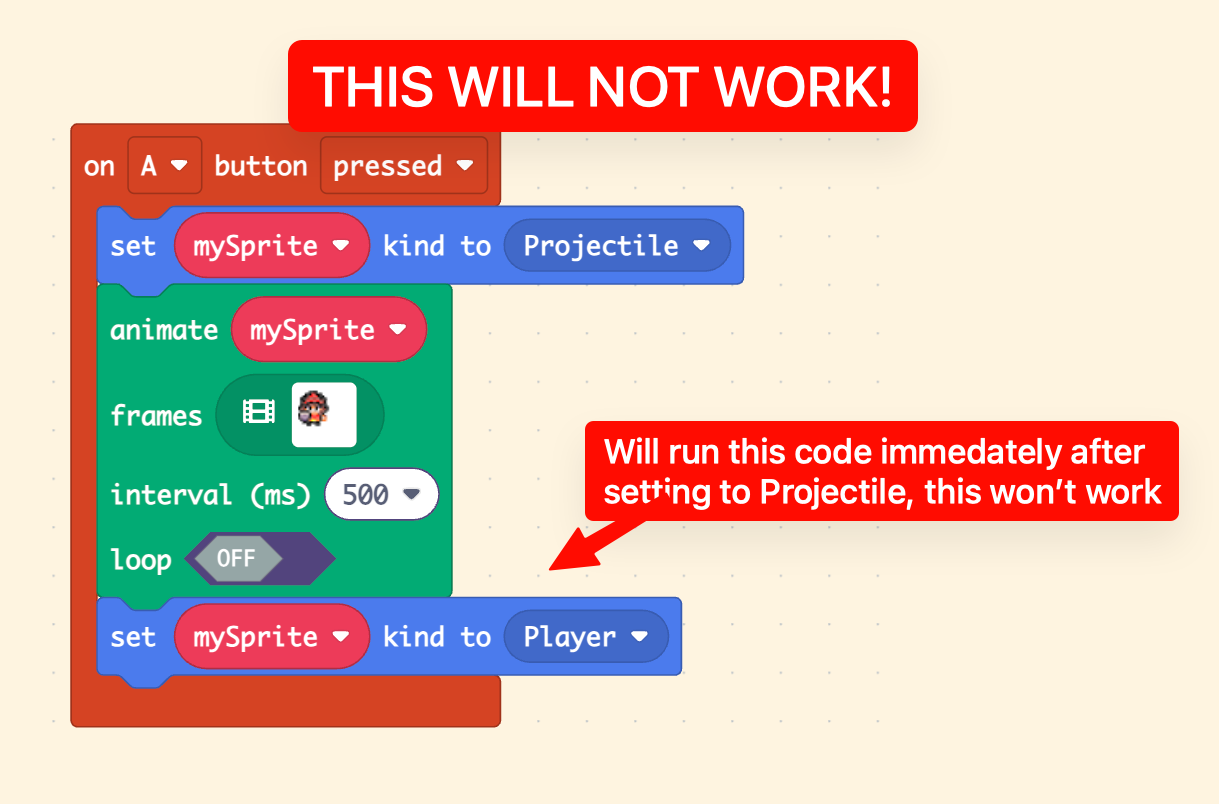
To solve this, when we press the A button we want to transition from being a Player type to a Projectile type but after a specific amount of time. That way if we are touching an enemy while attacking we will kill the enemy (see above). So we remove the setting back to Player type from this code and mark the time we started, so later we can undo that.
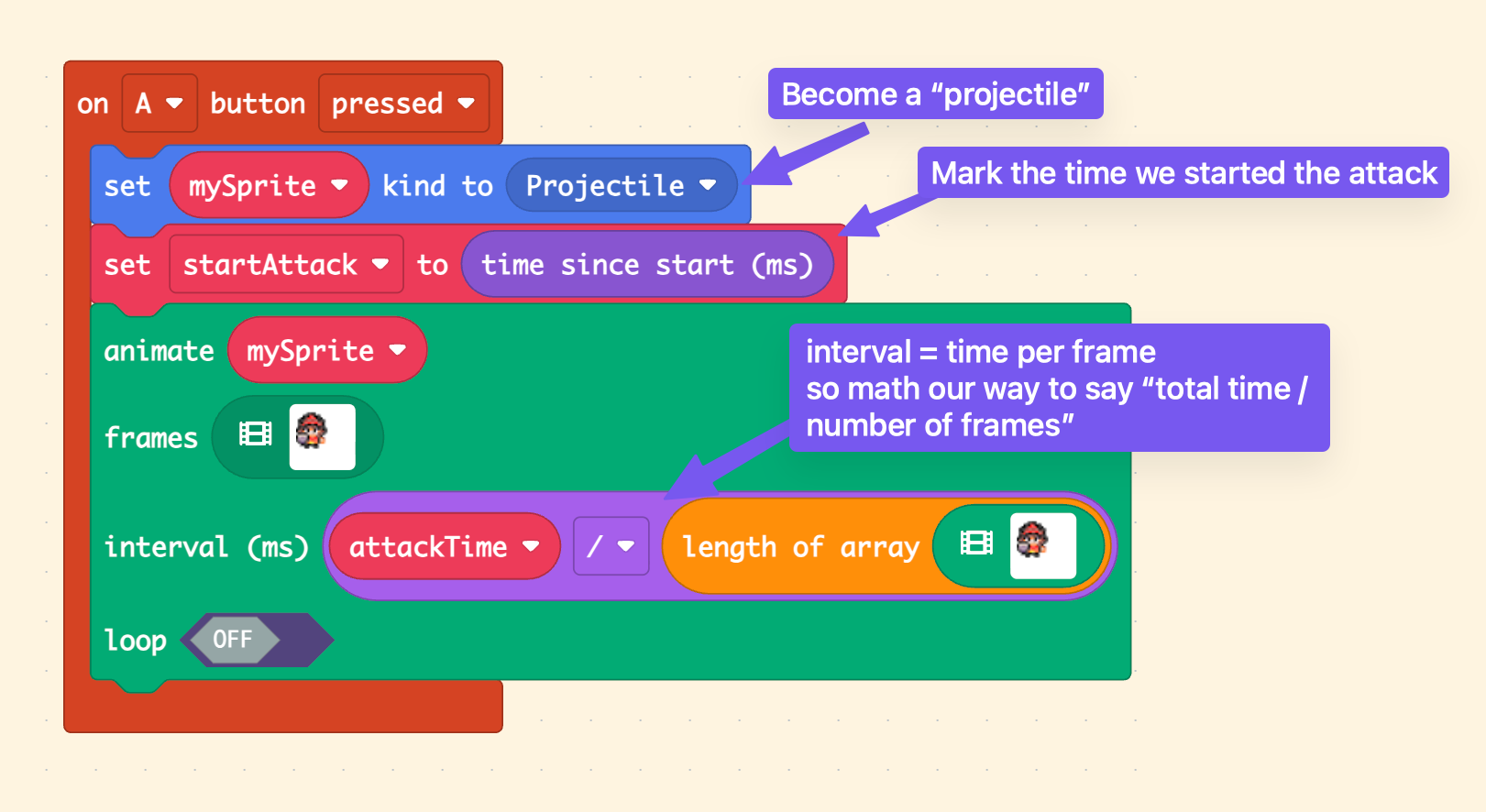
Breaking this down:
- When A is pressed, we instantly change the player to a Projectile
- Then we mark the time we started our attack, we want to keep track of this so we can determine when to STOP being a projectile.
- Then we run our animation. Note that animations run in their own “bucket” and any code after the animation is immedately run, not after the animation (this is the root of this pattern since we can’t just change the player back to a Player type at the end of this call)
Timing and Turning Back to Player
So once you have the player type set to Projectile it’ll be able to kill any enemy it touches during that time. Setting the player back to a Player type is key and making sure we do it at the right time:
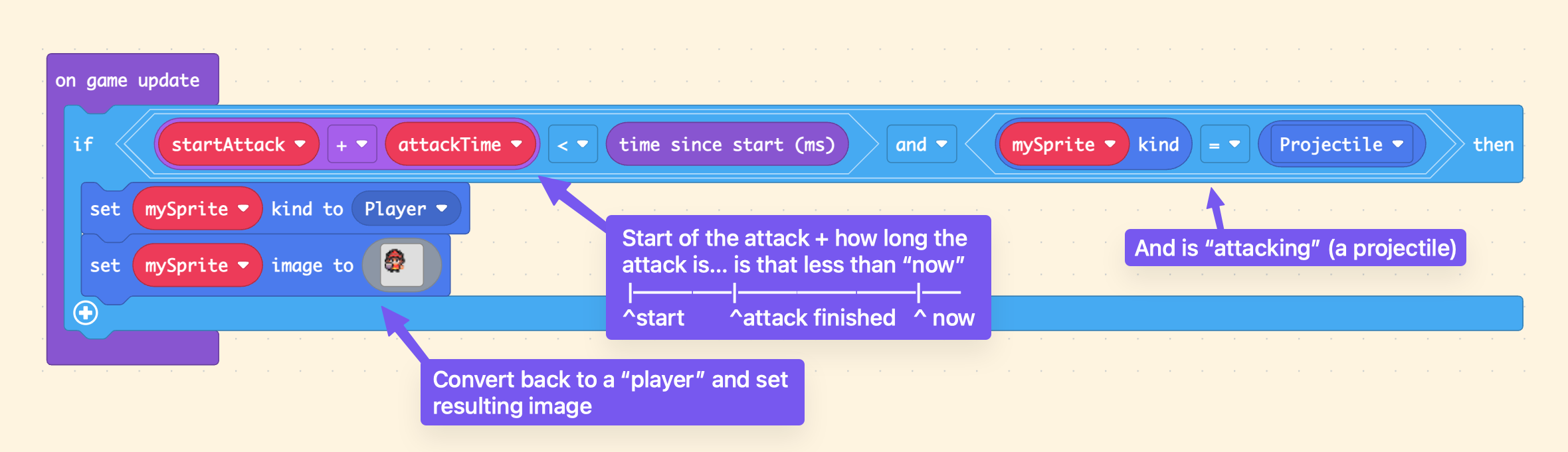
Breaking this down:
- The large if-check says “has the time where we started the attack + the amount of time that an attack takes passed?” and “is the player currently a Projectile type”
- Then we simply set the player back to Player type
- And do any cleanup we want, here we set the image back to our standing-not-swinging image
Conclusion
Keeping things timed is critical and an common usecase for any game. Anytime you say “and after X seconds I want it to do Y” this type of pattern will apply. You can expand on this to use the states for scenes (see the other Common Patterns post).
“I want this intro animation to run, then show the menu”
”I wan to swing attack animation, then be vulnerable after that”
”I want this animation to run after that animation”
Here’s a copy of the game with this code:
Why Not Use Timer Extension?!
First off I don’t like using extensions and they are hard to teach/limit/debug/etc. But if you use that extension note that the “after” block runs in it’s own little “container” similar to the animation. The biggest downside is that every time you press A you create another one of these “containers” which means it’ll be unpredictable when the player is set back to Player type. Also it’s resource intensive since you spiral up another timer-container every time you push A.
Awesome Extension?
As much as I hate extensions, I think a “schedule” extension would be handy for such things. “And after X milliseconds” would be kind of cool. Something that puts a time mark into the future on the on-update timeline and “schedules” code to run at that time.
|-----------------|-------------------------
^create event     ^schedule time

|--------|------------#--------|-----------------
^create  ^again       ^cancel  ^new schedule time