Is this in your super big extension witch I cant remember the name of? I you could use it with of the “for at most once every [number] ms” block in the timers extension to get a per-sprite version, as the identifier thingy uses a string.
I’m too lazy to add another extension so I’ll use the id
@richard this isn’t exactly coding related buts some user was asking for help with their game, as they needed a jump mechanic. I clicked the link, edited it, then added a jump mechanic. But after fixing the project, I completely forgot about the topic and have no idea where to find it to post the fixed version, as it’s probably buried somewhere and I don’t even remember the user’s username.
The game the user was making looked like this:

2 Likes
I have context! They figured out their issue and wanted the post deleted.
4 Likes
There seems to be a cap of 500 on velocity. I ran in to this problem making Hyper Speed, is there any way to get around it?
2 Likes
You can manually do the math for it yourself and move the sprite using the set x and set y blocks. It is velocity in pixels per second, so it would be something like “change sprite x by [ { (delta time ms) / 1000 } x (velocity) ]” I just made the parentheses different so you can see them easily. You’ll want to use the “raw” delta time block from this extension: Extension for Adding Delta Time to Blocks because I think the other block is still broken.
3 Likes
change the x every frame ig with sprite utils update before pyshics engine or smth
That is how I did it in Hyper Speed, just checking if there was another way.
2 Likes
Congrats btw! Your game is really fun!
3 Likes
I’m trying to learn how to do two different projectiles. My good guy sprite and a baddie are on the screen at the same time and shooting at each other. Baddie’s projectile hurts me and mine hurts him. I’ve really struggled with this. I think I finally have it close now. My projectile will hurt him. However, his projectile shoots at me but doesn’t hurt me. Also, a random one of his projectiles appears at the center of the screen and will hurt me. I can’t find where that random dot is coming from. Will someone help? This is just a test page so don’t judge the quality of the game. Once I get this down, I will put a similar code in my bigger game I’ve been working on, like having more control of where my projectile shoots, etc. https://arcade.makecode.com/S16978-05913-91581-01539
2 Likes
Welcome to the forum, @Armada_One! Your issue is that you are creating multiple sprites. Both of these two blocks, the “sprite…” block and the “projectile…” block, both create new unique sprites:
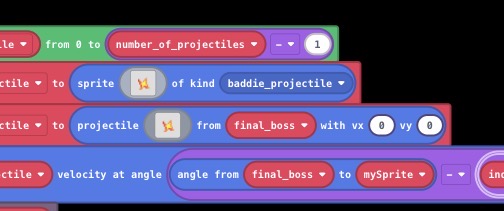
The variable “enemy_projectile” simply holds the most recent sprite created. That random dot is actually the first sprite, created with the type “baddie_projectile”, and it is a normal sprite, so it does nothing and just sits in the middle of the screen. This is why you take damage when you touch that sprite.
The second “projectile…” block creates a different “projectile” type sprite, which has some flags like “auto destroy” (destroys the sprite when it exits the screen) and “destroy on wall” turned on for you. This is quite convenient, but it won’t have your special “baddie_projectile” type attached to it, so it won’t damage the player.
Instead of creating two sprites, we can simply set the projectile sprite to have the “baddie_projectile” type after it has been created. This keeps the convenient sprite flags of a projectile sprite, but changes the type so that the projectile sprite can damage the player:
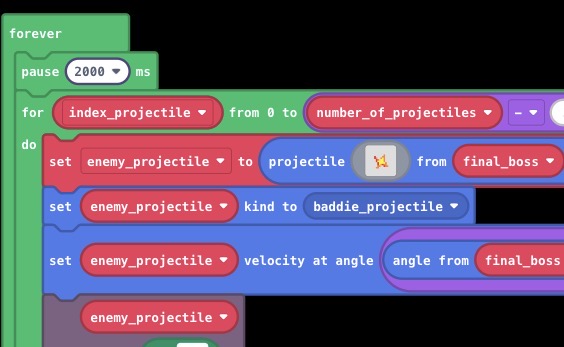
Now everything works!
4 Likes
That works!!! Thank you so much!
2 Likes
didnt want to clutter the forums but is this block

case sensitive
1 Like
Pretty sure you could test it yourself! I’m also pretty sure the answer is yes, but still test it and react to this with the duck if the answer is yes and the snake if no.
2 Likes
thx woofwoof
2 Likes
Hey Could you please cover the rpg extension in a topic its so confusing
@richard Is there a way to make a text box stick to a sprite like this?
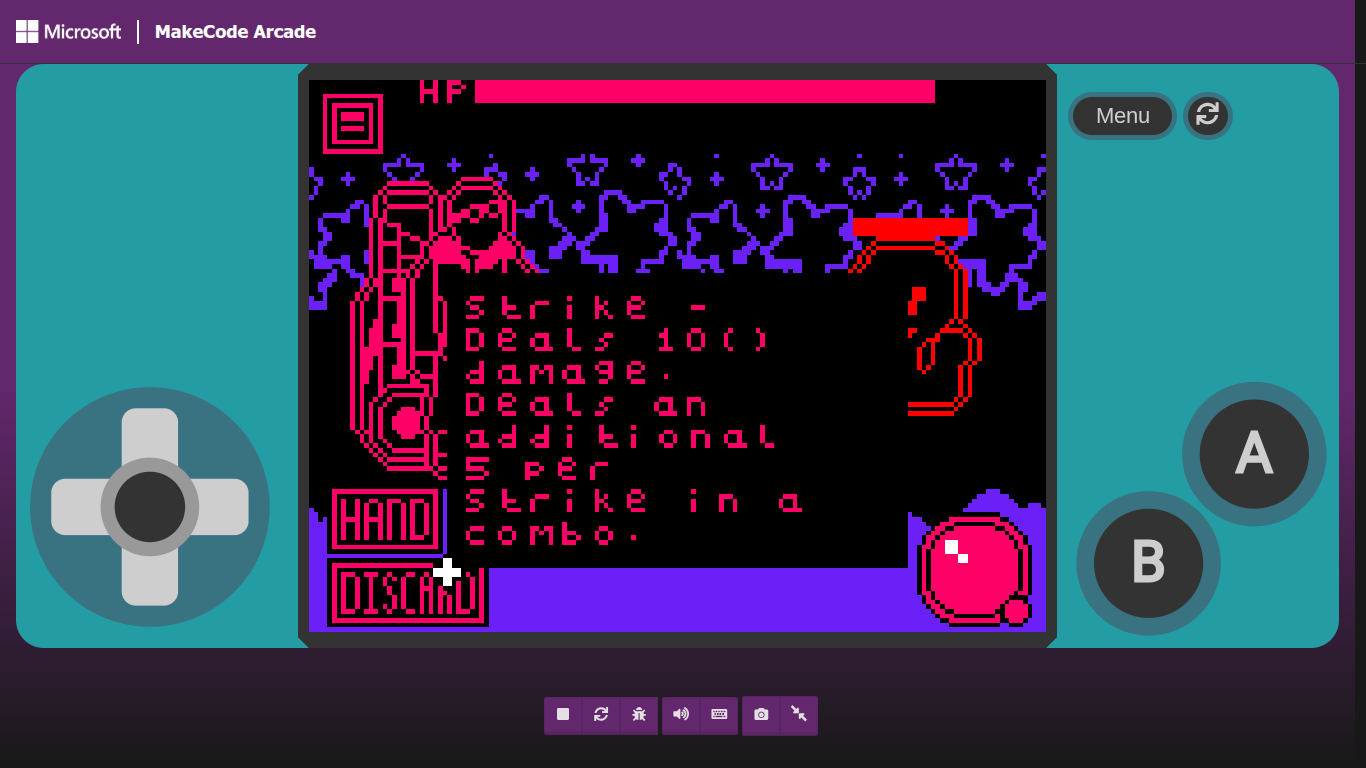
(From the bottom left of the textbox)
I kinda want it for my game but I know the ‘set position’ is based on the middle of the box so I dunno how to change that if you can
1 Like
You could calculate it by getting the image width dividing it by 2 and then setting the position to be there plus 80 and do it again but with heigh
1 Like
You don’t have to use set position to place a sprite. You can set left, right, top, and bottom, too.
2 Likes
Hello, I need some help. I want to use the following block in my game, but I don’t know exactly how to use it.

so basically I am making a map randomizer of sorts, where each letter in a string places down a certain tile onto an empty TileMap. (like for instance, say “abbbbbbbb” in a 3x3 would place an “a” tile in the top left, and the rest would be “b”)
When I tried using this, what I thought would happen is that it would put something like this [x,y,x,y,x,y] but instead it said [object Object].
I wanted to use this because I really don’t like the idea of a really really long list of if-else statements. If someone could tell me another compression method for this kind of map randomization, that would also be appreciated.
(I did check the help section, but didn’t really understand what it meant)
1 Like