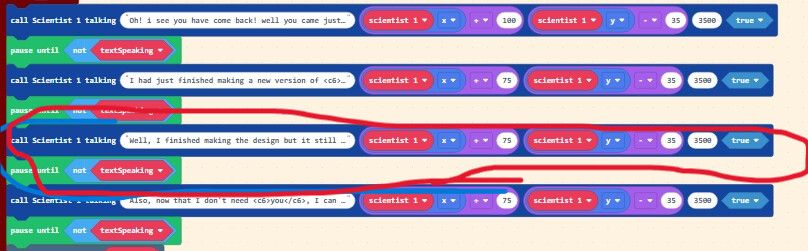
i couldn’t zoom out all the way to get the entire block but this is the main part.
the problem is the last 3 function ones with text in it. it works with all the other ones above it just not those three. even the code not function ones work after it but the text just don’t come out!
that’s all i have to say please help!
if you want to dig deeper into the code here’s the link. please be paitient when trying to get in, it might take long it might not. and if your looking for the level especially level 9. go to the very bottom.
i set it to level one (there is not function block for level 1) but you can play through it and if you don’t want to restart and play every level again, then you can just a function block at the bottom the “on start” block to skip levels.
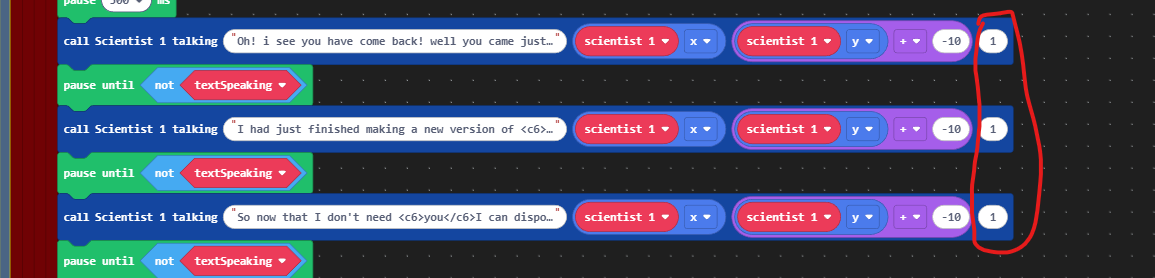
Ah, I should have seen it in your earlier screenshot. You’ve set the duration for the scientist to talk as 1 millisecond. It does not even appear because its not even on the screen for one frame.
and plus… i set it to 1 milisecond so i can skip it and start other stuff after it and just to check i changed it back to 2500 miliseconds but it still doesn’t work! if i can’t figure it out this and next week. then ill just make him mute. i can change him however i like anyway because i haven’t made a proper story anyway.
You also have the positioning of the text off, I fixed it and made some changes to your function to make the text more readable. With the default screen size its better to use a smaller font. Here you go:
as you see i copied what u did and changed the text but only that part doesnt work but the rest does. i think the text doesn’t like me. is there a problem? could you put the text in for me? also how do i make it show that scientist 1 is talking? like y’know it says (scientist 1) under the text or something. pls and thankyou.
i know its basically only me and @Bifrosty working on it right now but if anyone wants to help dont mind and just come on in! don’t feel shy! unless you just dont wanna help . Anyway! im trying to make the boss still but the im trying to make it shoot 4 shots at a time but i can’t seem to get it to work. does anyone have any ideas? but im also trying to make it have a super shot which makes it cover the ground with 1 row of spikes for a few times so like it cover the ground with a row of spikes and a second later it does it again for a few more times. anyone know how to do it?
Sorry, it took me a second to respond, midterm finals are rn. Fancy text can be weird sometimes when you have limited line width a lot of text you want to say. If you shorten the text it should work fine:
Once midterms are over I can help with your boss AI if you haven’t finished it.
Mid terms are already starting for you? mine start in janurary. anyway thanks for the help so far! and i did a bit of the boss ai but it needs some help with the projectiles and different attacks! and don’t rush the mid-terms to get here! im patient! take time! hope you do well!
Hey. @AlexK. OH! THE ALMIGHTY ALEX! PLEASE BLESS ME WITH YOUR KNOWLEDGE! do you know why the multilights lantern extention makes my level 9 sooooo laggy? like if i only play level 9 like start at it it wont lag, but when i play the whole level, it will lag, even if i start at level 8! it will lag! got any ideas? not asking @Bifrosty because he has mid-terms. good luck by the way!
anywayyyyy. Alex hope you can help in any way.
P.S i know its the lantern extention because when i toggle lights “false” it doesn’t lag.
the lights are laggy If you aren’t starting on level 9. you can edit the code to change the level and then play to level 9. it will lag a lot. or my laptop is just really bad. if you start on level 9 it won’t lag. It probably is a me problem.
Have you tried checking the sprite count upon entering Level 9 (or any other time the game seems to lag)? I haven’t had time to look at this in depth. Just giving you some ideas to investigate.
That’s not quite what I asked. Have you turned the sprite counter and FPS counter on to see whether they tell you anything about your project? If you don’t know that that is, then just ask.
You can access the FPS & Sprite counter by pressing menu and turning on “show stats” Though I find the FPS counter isn’t always reliable.
Thanks for all the support on midterms, they are not over yet but I have a quick minute to help since I think I know the issue. I had this exact problem with my boy who would be thunder game. I’m not totally sure what causes it. I do know it has something to do with loading a lot of levels consecutively (might be an extension thing). I also know you can fix this with the default “settings” extension. It lets you set variables that do not get reset when you reload the simulator. Its generally pretty useful when making a larger game like yours. Its blocks are pretty self explanatory.
Make a level “number setting” and every time you load a new level move the number up by one and use the “reset game.” Then start the player in the level corresponding to your setting. This should fix the lag. It can be tricky to implement but if the lag only appears in the boss level so maybe you could make a setting to help you reset the simulator only in this level.
Then that’s probably your answer. It sounds like you have a bunch of sprites that have let the screen but still exist. Make sure any projectiles that you create manually (i.e., you’re not using one of the create projectile blocks) has its auto destroy flag set to true.


 if i can’t figure it out this and next week. then ill just make him mute. i can change him however i like anyway because i haven’t made a proper story anyway.