I think the settings extension is very useful, but I can’t find how to save an image. I tried saving every pixel in an array, but it is complex and laggy. Is there a way to save images?
Unfortunately, that’s what you are going to have to do. 
How big of an image are you talking (16x16, fullscreen)? And is this only in the browser, or will you be using hardware too? (Hardware might just not work with a full screen image, as it will be a bit over 9.6kb at minimum)
I think full screen, because @GameGod is going to use it in his Pixx Artist thing.
@UnsignedArduino is correct. I am only using the browser. Currently, I have no hardware.
1 Like
I’ve got it! Maybe an array of images, with only one image?

It askes for a number array though, will it work? Only one way to find out!
Edit: Unfortunately, no.

Sorry, lost track of this thread! As noted, this won’t work well on hardware for large images, but here’s a quick javascript program that will save / load images into storage:
when you press B, it will save whatever image is stored at the beginning of the on b button pressed event to storage, and when you press A, it will create a sprite using the image that was stored in memory.
controller.B.onEvent(ControllerButtonEvent.Pressed, () => {
    const toSave = img`
        1...............................
        ................................
        ................................
        ...............444..............
        ..........44444..4..............
        .......444...4444.4.............
        ......4.....4777744.............
        ....44.....47777774..444........
        ...4.......477777744.4..4.......
        ..4...4444444777774.44..44......
        .4..447774777777774..4....4.....
        .4.4777747777777774..44....4....
        .447777747777777774..4.4...4....
        .477777477777777744444444..4....
        .447777477777777447774.4.4.4....
        4774777477777744.47774..4444....
        4777477477777477477774....44....
        4777747477774777477774....44....
        4777774477747777477774...44.4...
        4777777447477774777774..4.4..4..
        47777774.4477747777774.4.4...44.
        4777777447777747777774.4.4....4.
        4777777447777477777774444.....4.
        4777777447744777744444........4.
        47777774444..4444444.........4..
        47777774444444444.4........44...
        .47777774.44....44......444.....
        ..4444444444444444444444........
        ................................
        ................................
        ................................
        ................................
    `;
    const w = toSave.width;
    const h = toSave.height;
    const imgBuf = pins.createBuffer(h * w);
    const rowBuf = pins.createBuffer(h);
    for (let i = 0; i < h; ++i) {
        // load one image at a time...
        toSave.getRows(i, rowBuf);
        // and save to the buffer we're going to store, offset from the start.
        imgBuf.write(i * w, rowBuf);
    }

    settings.writeBuffer("my-cool-img", imgBuf);
    settings.writeNumber("w", w);
    settings.writeNumber("h", h);
})

controller.A.onEvent(ControllerButtonEvent.Pressed, () => {
    const loadedImg = settings.readBuffer("my-cool-img");
    if (!loadedImg)
        return;
    const w = settings.readNumber("w");
    const h = settings.readNumber("h");

    const outputImg = image.create(w, h);
    for (let i = 0; i < h; ++i) {
        const row = loadedImg.slice(i * w, w);
        outputImg.setRows(i, row);
    }

    const a = sprites.create(outputImg);
});
2 Likes
I’m not good with JavaScript… I need it to save the background on game update for my pixx artist pro game. I want it to ask “reload your last drawing?”, and if so, set the current background to the last drawing.
I’ll make a quick extension for you 
1 Like
Thanks for that, extensions really help!
Okay, here you go:
and quick example https://makecode.com/_E4kMLR6df0VP
I added the blocks to the bottom of the image ‘category’, which is under ‘advanced’.
Just one final mention, this won’t work great on hardware for large images / is optimized for speed, so a full screen image will be about 20kb / likely more than a physical device will be able to store.
2 Likes
Thank you so much!
Would I use the “if setting exists block” in the settings extension?
As of v0.1.2 you can . If you just try and read it like I do in the example, though, you can drop the result in an if, and if the setting hasn’t been created it will just not run that if – the result is ‘falsey’ in that case.
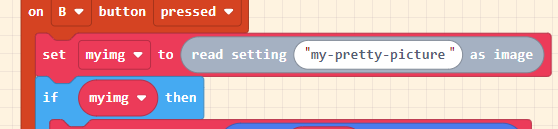
2 Likes
Sorry to bring you back here, but I tried adding this extension to my Art game but it doesn’t seem to exactly work. I may be doing this wrong as I’m in block code right now, or this extension might not have functionality for this. I’m still relatively new to coding so any help would be greatly appreciated. 

Im trying to get the game to save a drawing that the player made in which the player can then load that art that they made back in. I’m trying to make it so that the player can loading drawings even after closing the game tab and then reopening it. I’m not sure if this is exactly possible because I feel it would require a highly complicated system to get what I’m looking for. If you would like to look at my game I’m trying to add this to here is the link to it: ARCANE DRAWINGS. (A actual working painting game) [COMPUTER ONLY]