what i like to do is use the extension Sprite Data (you can find it in the default list). When creating the cards, set a number value for each one, corresponding to their order (1 - 7). Set up another sprite data for what player the card belongs to (1 or 2)
Make a variable called selection
when pressing L or R, change this variable by 1 or -1 (also make sure that you cant make the number -1 or greater than 6) This is the number that will correspond to the selected card.
Make a function to visually update the given sprite. This will be the updated form of the selected card. Make sure you code in the unselection of any previously selected cards as well.
To obtain the correct sprite input, use the get value from array of the card sprite kinds. This will run through every single card. But by setting an if statement to sort for the card data that = the selection variable, we only get 1 card. This one card is the “selected” card who’s card data corresponds to the “selection” variable.
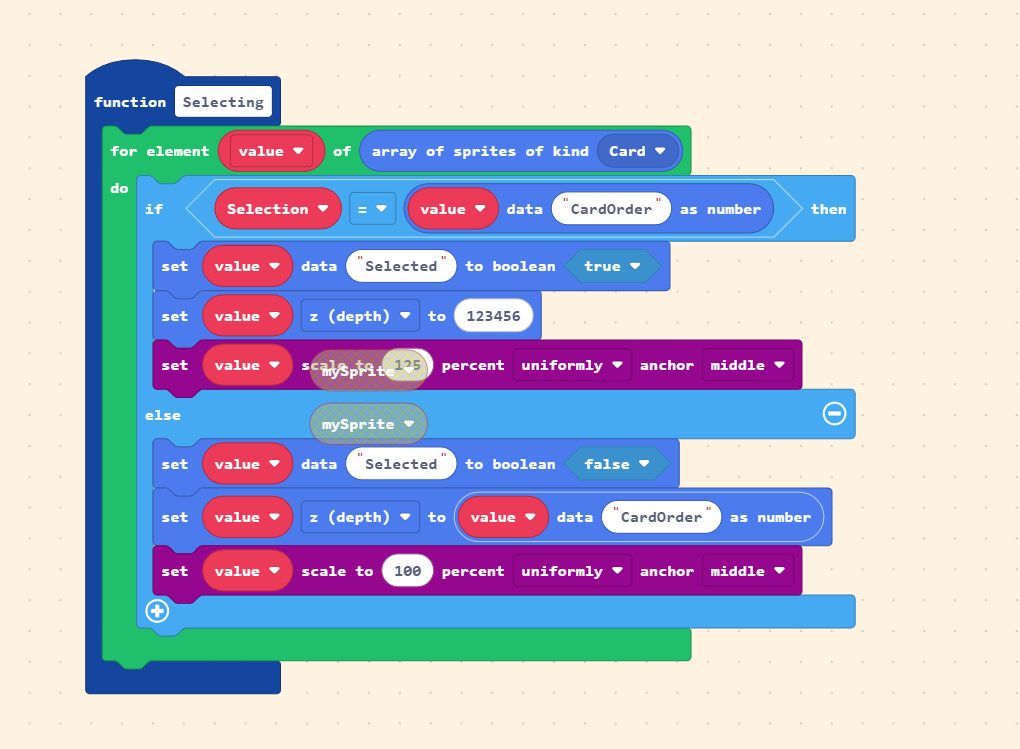
(here i just increased the scale and the z value to make it larger and appear on top of other cards)
Bringing it together, place the function in the on L and R press.

this is actually descibing how i coded the card selection for Card Delver lmao so PLS do not copy the code exactly with the values as it is not going to translate 1 to 1