I created a new project for the first time in like a year, and not an hour of the way through my project already seems corrupted. I do not get any errors in the block tab, which is where I was working, but the simulator doesn’t show up no matter how many times I reload. I changed basically nothing. There is a problem that shows up in javascript, which I will fix to the best of my knowledge, but this is actually insane. My project should not have broken in this way, and had it happened to any kid just starting out they would not have been able to figure out what was wrong, considering there was nothing at all wrong in the blocks tab. That might be a bit of an exaggeration, since people that start out will not use 2d arrays, but the attached picture shows the issue. My code was working fine before, and then suddenly the type of the array in javascript changed despite still showing up as an empty array in the block tab. I didn’t even change it. Oh and when I finally fixed this, all the blocks of code that refer to image dimensions turned grey, forcing me to redo that code. Then the array problem reverted, and even though I made it into the number type it turned back to this Array type.
Here is the link, I didn’t want to share this just yet but I can’t work on this until it is fixed. I assume somewhere else in the code something might expect a different type either due to a bug with make code or a fault of mine, but I cannot find it.
While I make this post, I may as well ask about another issue I have been having. I use a monitor with an unusual aspect ratio, 4:3, but this ends up with the make code simulator having flickering bands for some reason. Just annoying.
theres no such thing as an Array[]! in fact, I don’t think Array exists. If you just converted to js, that can mess up your code. maybe thats the issue. I think doing let wall_list: number[][] = [] should fix it.
Ah so you didn’t read my post. The error happened before switching to js, and the only way I actually found it (because it did not show up in the blocks tab) was switching. As I also said, I knew that was the issue, so I changed it back to exactly what you said, once again as I mentioned in the above message. The issue is that when I do that, a bunch of my code doesn’t convert back properly into blocks, and my code in the js tab reverts, meaning the variable gets incorrectly typed as Array once again.
Also, interesting problem. Looks like there might be an issue moving your project from an older version of MakeCode Arcade to the current one. Hang in there. We should be able to salvage this … although we might need to get creative. Strange that the parser is having trouble moving back to Blocks. Those gray blocks, in particular, are strange indeed.
Version history gets me back a pretty complete project, thanks so much! I forgot about the feature lol, it has been so long since I have used make code. I hope you and the other devs can maybe figure this out, no way to know if others have had the same problem or will in the future. And what do you mean by moving it from an older version to the current one? I started this project yesterday, shouldn’t it be on the correct version? When I shared it was after it had broken btw.
I misread; I thought this was a project that you had created a while ago and were returning to it.
When you work on a project, MakeCode notes which version of MakeCode you were using at the time. When you open it later, it compares the version that was last used with the version that you are currently using. Projects sometimes need to be manipulated when moving from one version of MakeCode to another, newer one.
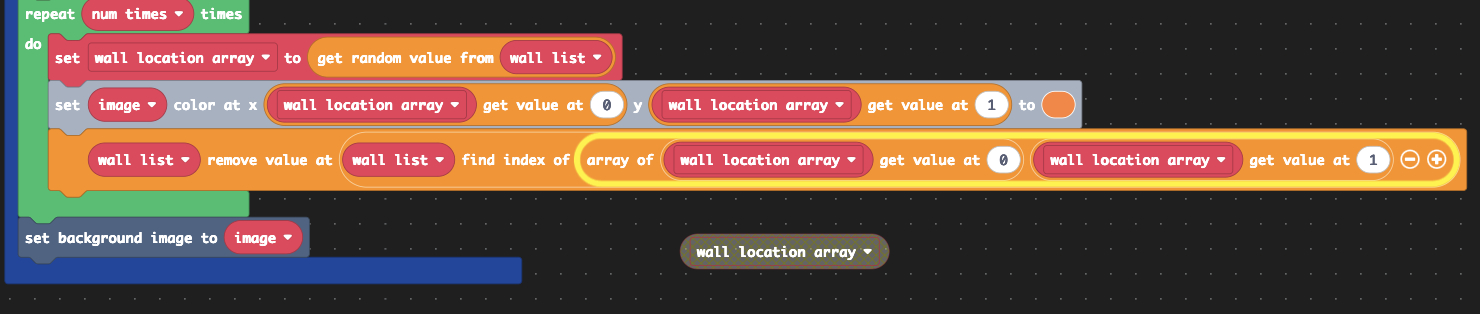
I figured out what was causing the error, and it is strange. I went back on the version history and then did the exact same code (or very similar), and ran into the same error. At one point in the code, I request a random set of coordinates from the 2d array wall list, and set another temporary variable to it. After I am done using it, I basically go wall list remove value (wall list find index of temp variable), which it doesn’t seem to like. I don’t know why, I thought it was clever, but make code does NOT LIKE THIS. Hope this helps!
Another update, swapping this for this somehow works, even though instead of referencing the variable I am referencing 2 halves of the variable… I just don’t even know at this point, just gonna do whatever
Sorry for yet another update, don’t know if this is important but it does currently work, except I constantly get a red notification that says “unable to convert your program”, plus if I click on the javascript tab (which I got curious about after the notification covered my code for the millionth time), it says “Oops there is a problem converting your code”. I will continue coding, but I don’t want to do a whole bunch of work when it could just break in the next few minutes.
Ah sorry, forgot that you weren’t on the dev team. I did some more work on the project, it said I couldn’t switch to javascript, so I switched to python to see if that worked, but now I can switch to javascript but not blocks… I can send a link to this, but I just decided that working on this in make code wasn’t worth it, and started coding it in godot. I’m still interested in helping determine the cause of this bug, but if it is too much trouble for you to find out the error, don’t worry too much.

 Strange that the parser is having trouble moving back to Blocks. Those gray blocks, in particular, are strange indeed.