What does this block do

and also this one

I would love to use them but I have less than an idea on how to use them but the help didn’t give a clear explanation also
Pinging
@WoofWoof @AlexK
What does this block do
and also this one
I would love to use them but I have less than an idea on how to use them but the help didn’t give a clear explanation also
@WoofWoof @AlexK
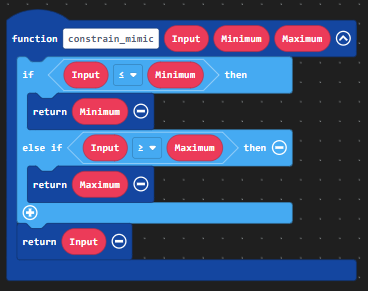
Constrain takes a number and modifies it if it meet’s the following requirements:
If the number is lower than the minimum, the number will be modified to be the same value as the minimum.
If the number is higher than the maximum, the number will be modified to be the same value as the maximum.
If the number is within the range as the minimum and the maximum, the number will not be modified and be outputted as normal.
If you still don’t understand, I made a visual representation of it in blocks.
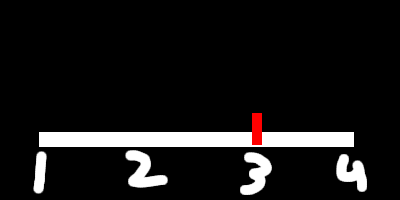
For map… Uh… Here’s a slideshow.
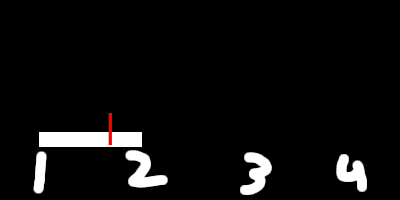
Now let’s map that to a low of 1 and a high of 2:
That’s basically what map does. It’s very broad but the visual explanation might help.
The constrain block is like a range. In the first number slot you can put a variable and the other two (min) and (max), it will see if the variable is between those numbers, if not, then make it the minimum/maximum it CAN be. Example: “constrain (15) between (-10) and (10)” turns into 10 because 10 is the max the number may be. It can be good for, say, keeping a sprite on screen.
The map block is similar. It compares the variable/number you choose in the first slot and finds its position in the first set (from low to high) into the next one (to low to high). Kind of like re-scaling it, or a ratio kind of thing. Example: “map (5) from (0-10) to (0-100)” turns into 50. This can be used for like if you want the player’s speed to change based on a joystick rather than simple digital inputs/buttons.
thanks to @redSprite and @BLADEr so I was missing out on literally nothing i never had a reason to use that in any of my projects nice
@AlexK thanks for the edit