I know that this is not the place but…
https://github.com/microsoft/pxt-arcade/pull/7535 :add platformer blocks to the extension list
I know that this is not the place but…
https://github.com/microsoft/pxt-arcade/pull/7535 :add platformer blocks to the extension list
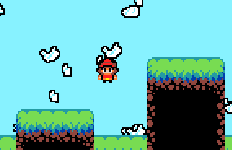
Oh and @richard here’s the thumbnail:
Umm I think there are more requirements than just a thumbnail, and that thumbnail needs to be INSIDE the github project
something went very wrong with your PR, looks like you’re overwriting the entire targetconfig.json file with the code from your extension. take a look at the files tab of the PR i linked and @BLADEr’s PR to see what this should look like
@BLADEr sorry if I am doing this in your topic!
Oh sorry I didn’t understand what you meant by ‘add your extension’
https://github.com/microsoft/pxt-arcade/pull/7537 here is the new PR!
@RizeUpDev a few notes:
//% color="#000000" at the top of your namespace to set the block color (replacing 000000 with the color of your choice)testing out your extension, i’m encountering a lot of bugs. right now coyote time doesn’t seem to do anything and if i register a slope it crashes the game once i overlap the slope tile
Noted! Could you merge this into a new topic?
done!