I’m going to get rid of the animations before the slime spawns because it causes lots of trouble for me.
Sorry for the bunch of question.
How do I make it so that a bunch of sprites have separate status bars that get damaged? and make it so that if i hit 1 slime, it doesn’t hit a separate one somewhere else?
Use Joey’s status bar extension. (Search for status-bar in the extensions page.)
Destroy the projectile as part of the sprites.onOverlap() event. Once the projectile is destroyed, it will not collide with another sprite. If you don’t want to destroy the projectile, then turn it into a ghost instead.
2 Likes
I am using the status bar extension yes. But the problem is. I have multiple slimes all over the map as the same type “slime” so when I hit one, it hits a different one for some reason. It’s not that it hits more than one when the slimes overlap each other, it’s that it hits a whole different slime because my code for some reason makes it so that when my swipe overlaps a slime, it makes the status bar go down -1 and also make it run an animation. But it doesn’t do it to the slime I’m hitting, and instead doing it to another slime. It’s so difficult since they are all the same sprite. I was also wondering if there is a more longer way of doing it so that it won’t be weird? Idk how @Bifrosty did it with his game. Ig I’m stupid or something.
I’m guessing you’re using one of your mySprite variables. Make sure you’re using the “local” variables for the function (either sprite or otherSprite in the case of an onOverlap() handler). If you know which function is malfunctioning, the let us know which.
1 Like
Ya I used the (other sprite) but idk. I’ll try it again today
well there are many ways, I’d recommend looking it up before finding what you like. I would use Celeste’s way
1 Like
Oh ok I’ll probably make one over the weekend
1 Like
I’m sorry everyone that I hadn’t worked in a few days. I’ll get back to it during the weekend hopefully.
1 Like
I’m so happy right now! 
I managed to fix the attacking thingy! woo!
@WoofWoof this time it’s a bug.

I made it so when a projectile overlaps me it will do something:(have’t done what it does)
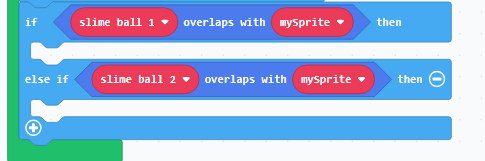
But then it turns into a bug in this area:

I can’t quite grasp why it’s not working. If you need any more information please ask. but don’t ask for the game link? (I don’t want people playing it yet.)
1 Like
I cant find the issue from the given snippets, the most likely culpret from what I can see is mySprite.
Any chance you’re destroying the sprite before that 500 ms pause completes? I don’t have enough information to find the issue. Does removing that overlap code fix the error?
3 Likes
@Hulahoop I made it in Makecode (with Claude to make sure it was accurate), so you don’t have to find the code yourelf
2 Likes
Do you mind if I just copy this into my code?
Also can you explain what all of it does?
Thanks!!
1 Like
Yes. When I don’t include the overlap code, it works.
Here:

I destroyed the attackswipe and then created it again. If that answers your first question?
1 Like
Well the error message is saying that there is some sprite facing left or sprite facing right code that is the issue. I don’t see how the overlap code could cause that, but try wrapping the whole overlap if-else block in something like
If <<(slime ball 1) and (slime ball 2)> and (mySprite)> …
This will check that the slimes and the player sprite both exist before running the overlap code.
2 Likes
It works! No wonder they call you the scientist! Thanks so much @WoofWoof!
3 Likes
did you know you can replace < variable = > with < variable >? and < variable = > with < not >? It just bothers me, I’m not trying to sound mean.
1 Like
I mainly made it to be copied off of (like a lot of my stuff). Im also bad at explaining and I will confess I used AI to explain it (but I reworded stuff).
jumpWindowEnd stores a timestamp (in milliseconds) marking when the “extended jump” period runs out. It starts at 0, meaning no jump is active.
On jump pressed:
- Sets vertical velocity to -130 (negative is up).
- Makes a 200 ms “jump window” by setting jumpWindowEnd to the current time plus 200.
Every Frame:
- Gravity is ay. Normally it’s 800 (heavy). But near the peak of the jump, when vertical speed is small (under 60 in either direction) and A is held, gravity drops to 500. This gives a floaty “hang time” at the apex, a common platformer feel trick.
- If A is still held and the player hasn’t bonked their head on a ceiling tile, upward velocity is held at -130 (Math.min keeps it from being any slower upward than that). This effectively cancels gravity for those 200 ms, so the jump keeps rising.
- If A is released, or the head hits a ceiling, the window is closed immediately (jumpWindowEnd = 0), and gravity takes over.
1 Like