Woofy's Corner

This is a place for me to dump random things I’ve made that I don’t feel deserve their own topic. I’ll be going through my old projects, probably deleting a lot of stuff, and putting cool things I find in here.

Feel free to ask any questions you have about projects, I’ll totally be willing to answer any technical questions as best I can! Also opening this up to general programming questions if you have them, just try to condense them into as few messages as you can instead of sending multiple at a time.

Apologies in advance to the mods :heart_hands: because I don’t actually know how many projects there will be. Hopefully I haven’t got too many cool projects to share. After I’m done going through old projects I’ll dump other random stuff in here as I make it. Enjoy!

19 Likes

Imagine suffering from success. :rofl:

8 Likes

lowkey I need to dump all of my massive list of games somewhere..
1 second later
come on a lot of them are in a zip file on a computer I wont be able to access for a long whike

3 Likes

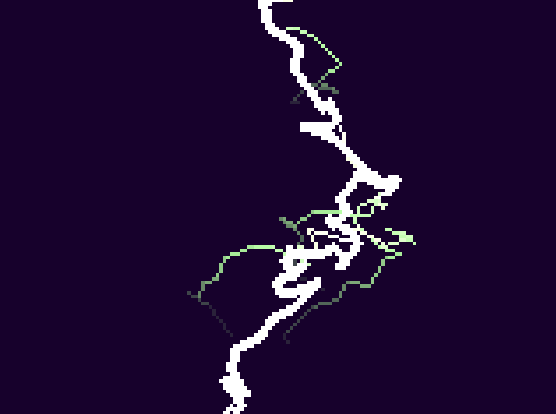
I just made this yesterday and it’s the project that inspired this topic, because I don’t think it needs its own topic but it’s still super cool and I want to share it. The background color, lightning color, and the “tint” can all be changed, but the math I used to mix the colors together… well it isn’t great, so a lot of color combinations won’t work well. Maybe I’ll fix that, idk. Here’s some interesting screenshots I have of different colors:

12 Likes

This is 6 x 6 tile rendering done in blocks for this help topic and I’m pretty proud of it tbh

6 Likes

THAT LOOKS AMAZING :open_mouth: :open_mouth: :open_mouth:
is this like some fractal stuff??? or is it like that freaky spider thing you made last year for a mini game jam (i totally forgot what that joint maths coding thing was called). would love to know if theres like certain params you can change to make unique energy beams and attacks

6 Likes

It starts with a point at the top and then creates new points a random distance away, but made so that it’s more likely to go down than up. Then every time a new point is created it has a chance to split into 2 points.

Basically the points are a long linked list linked both forwards and backwards (each point keeps track of its parent point and its 1 or 2 children). Then once 1 of the points is touching the bottom of the screen the program traces up its parents and gives them all “brightness level 16” and then every other point is given a brightness based on its parent’s brightness minus a number. Then they are all drawn to the screen with the brightness 16 lines being drawn last and extra thick.

2 Likes

Someone PLEASE make a boss intro with this, I just need to see it

3 Likes

Luke saying that art looks amazing must mean it’s REALLY amazing. Good Job @WoofWoof!!!

3 Likes

Lowkey might try to extensionize this just for fun

3 Likes

Wouldn’t be too hard but it’s not gonna be super performant, and there are still issues with lower light level beams rendering over higher ones making them look weird. Also would probably want a way to direct the lightning from 1 point to another… which doesn’t sound too hard actually….….… hmmmmmm

Actually screw it too much math I know js and classes but I don’t know how other people’s code works cause I just suck at that

2 Likes

That’s alright! Personally I would want to make a lot of improvements before I turned this into an extension. Currently it wouldn’t be very good to use in any game because it completely changes the whole palette to make the lightning tendrils fade.

1 Like

I’m trying to learn JavaScript so I decided to figure out how to make it render over time, not immediately, and I sort-of succeeded.

But also, can you please explain what classes are? I am very interested to know because it’s probably very useful.

3 Likes

They are also @Sarge made a solid explanation on them

They are in section 3 it does not teach you about methods(class functions) or inheritance (parent stuff I don’t understand)

4 Likes

Classes are like templates for objects. I would recommend you an explanation by @Sarge here: [Tutorial] What are block objects, and how to use them

There are 4 dropdowns. You can ignore the last one, as it is for block coding.

2 Likes

Great job! I originally had it render instantly but I was having issues with how they were developing over time and so I added the slowed bit to help me solve those issues. It looked cool so I left it in.
I’m sure you could get it to render from top to bottom if you wanted, instead of main bolt then extra bits… and I have been thinking I should make the brightness of each strand decrease as a function of its length instead of just a set incremental decrease… I’m gonna try some stuff!

Ok I think I want to make a larger tutorial style explanation of classes, and I wrote a lot, like, a lot a lot of explanation, but I think I’m gonna make a larger “how to use classes” post (if that doesn’t exist already?) and maybe even a series of technical explanations, so yeah. The short answer is that they are like boxes for data basically, or more like instructions for how to create a box of data, and then you use the “new” keyword to create the boxes. And you’re right, they are VERY useful! The long answer is, um, whatever this rambling idiot wrote down there.

Ok so a class is basically...

Ok so a class is basically a definition for a data structure. Think of it like code that defines what a box should look like, a box that you put data into. Sprites, for example, are a class with variables like x, y, z, velocity, acceleration, image, hitbox… basically the class defines all that stuff, and then you use the keyword “new” to create a new box and shove the data into it.

The “constructor” is code that runs only when the box is first created, aka when the “new” keyword is used. You use the constructor to set up the box for doing stuff, like how when you create a sprite you have to give it an image and a sprite type, but the constructor does stuff like automatically place your new sprite in the center of the screen, give it a hitbox, set its velocity to 0, etc.
In the code for the lightning, I called the class “point” because I am unoriginal and boring, and you can see that the constructor takes in variables like a function does (it is a function) for the x, y, and the parent point. Then the constructor handles setting up all the variables that are all defaults when the object is created. I do a fancy thing in this code that makes it a little harder to understand, which is using the word “public” before the parameters in the constructor to basically make them variables of the class without ever defining them before the constructor. Normally you would define these variables and then set them in the constructor, but the way I did it just shortcuts that whole thing, which is convenient. Normally you would write it like this:

The word “public” can also be used before the variable definitions (the var: type things) elsewhere, but it’s not often necessary in classes because variables without a declared visibility are automatically public. The word “private”, on the other hand, is used before variable definitions to make that variable invisible to code outside of the class. This is useful when a feature of a class would break if a variable is used outside of it incorrectly, but personally I don’t often use it because it’s my code and I’m not really gonna share it with other people, especially in tiny projects like this. No, that is not good code practice, thanks for pointing that out! I do not care.

I used the word “static” in this project as well, which is basically saying that the variable is attached to the instructions for creating the box, and is not a different variable for every different box created. This is basically just an organization thing. It could just be a variable called something like “allPoints” that is a normal variable outside of the class, but instead I attached it to the class, so you use the code “point.all” to get the list of all points insead.

Then something that I didn’t do here is that you can attach functions to a class as well, so it doesn’t have to be just variables. This is great because attached functions can see any private variables that you have in the class and do stuff with them. I’m not gonna go too much into that, and there are also getter and setter functions and some other key words that I’m not gonna get into for this short (ha!) explanation.

This explanation could be soooo much longer but I’m gonna stop here… for now :3

5 Likes

Ok so here’s another thing that I wanted to do to see if it was possible:

This is code that accesses the stored animation of a given sprite, allowing you to edit said animation without it stopping, which is neat. You can’t change the number of frames though, because obviously that would cause issues. I could probably also make a block that gives you which frame the sprite is on. I did consider making this an extension with like just a few blocks, let me know if you’d be interested in that by reacting with uhhhh :duck: I guess.

3 Likes

Sad Woofy-encountering-sound-events-limit noises
This one is basically creating a bunch of tunable white noise sound events and then making the higher pitch ones quieter when you’re out of the rain. It takes a bit for the sound to adjust because each sound event is half a second long and it waits for the previous one to stop before creating the updated one. It sounds horrible if you try to stop the events instantly to spawn the new ones because spawning sound events is not instant and so there’s an unfortunately noticeable gap. Maybe I’ll figure something out to get around that issue or make it not sound as bad in the future because the way I do it now causes the sound events bug to happen in like 10 minutes.

5 Likes

I use a similar technique for mapping textures on my animations!

1 Like