Previously I made a tutorial to functions, and arrays seem even more important to understand, so hopefully you’ll learn something!
Arrays
Creating an array
You can find arrays in the orange section among the “advanced” categories. But how do they work and how to use them?
Let’s say you want to store names of five people. That’s simple, right?

(names were randomly generated)
Okay, but now what if we want 20 people? Or 100? Nobody wants to make that many variables. And what if you need to get “person number x”? You would need a giant “if else if else” tower. This is clearly not the way to go.
So, how will we do this? With an array! To create an array, put the text list from the top of the array category to the on start block. You can now put the names in there and add more space with the + button (after there is 4 or more it will swap to being vertical)

(here I also renamed the variable)
But, what if I need to know someone’s name? You can do that with the list get value at 0 block!

What does the 0 mean? It specifies an index! What is an index? Well, it works like the number of the person, but it starts counting from 0, so the first person has index 0, the second person has index 1, the third person has index 2…
Let’s add a sprite that will say the names for us so we can test our code.
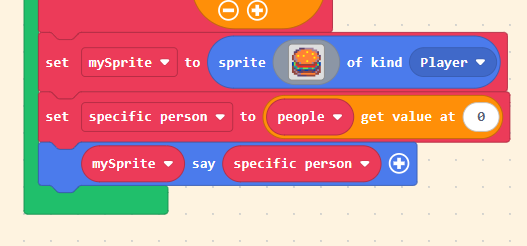
Right now the sprite says the first name from our array. But why? That’s because the index is 0, and that belongs to the first person. When we try to change the number to 1, we will get the name of the second person. But when we try making the index 5, the sprite doesn’t say anything. That’s because index 5 would be the sixth person, but our array only has 5 people.
Adding elements
Now we might want to add people while our code is running. That isn’t very difficult. We have three different blocks that can do that.

The first two are self-explanatory; the last one allows you to specify the index at which you want to add the value. In the screenshot I put 2 there, so “Maynard” will be at index 2, and all the names that were there previously will be shifted by 1.
Changing elements
If you want to rename someone without creating a new person, you can do that like this:

The number is again the index of the person.
Deleting elements
There are multiple blocks you can use to remove elements from arrays
.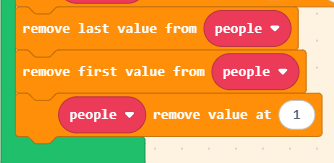
The last one again uses the index.
There are also some get and delete blocks that work like the “get” blocks and “delete” blocks at the same time.
Getting indexes from values
What if I want to know what is the index of “Philis”? At the bottom of the category there is a block made exactly for that

Then the variable “index” will be a number that corresponds to the index of “Philis” in the array.
If the name isn’t in the array we will get -1. Therefore, if you want to check if something is an element of an array, you can check if (array find index of (value)) ≠ -1.
In this example we used text, but arrays can have anything in them! Numbers, booleans, images, or even other arrays (I’ll talk about that later)!
Loops
You might have used a loop before, maybe to do something multiple times or repeat it until you want it to stop. But with arrays we can make loops in a very useful way. We are going to use the for element (value) of (list) do loop!

But how does this loop work? It repeats the code for each element of our array! This might sound confusing, but let’s continue with our array of names we made earlier. We will make a sprite that will say all the names we have in our array.
Firstly we will create the sprite (do not create it inside the loop, that would create multiple sprites!) and then we will add the “for” loop under it. Inside the for loop we can add mySprite say (value) and wait 500ms (otherwise it would happen instantly).

Our sprite will say each name for 500ms (half a second). How does it work? It first runs the code that’s in the loop but replaces value with the first element of the array; after the code has finished, it runs it again but with the second element, then the third, until it has finished the whole array.
Warning: do not delete elements inside the loop. This can cause some elements to be skipped.
Now, some other things I forgot to mention:
length of array (list) will get you the number of elements in the list, but that means that the last element is at index length - 1.
If you create an array in a variable “list1” and then create a variable “list2” by doing set list2 to list1 then you aren’t creating a copy; both variables are “pointing” to the same array! That means that when you remove an element from list2, it will be removed from list1 too.
Animations are actually just arrays of images. That allows you to change specific frames while the code is running!
Nested arrays
Nested arrays are arrays inside of arrays. They are quite annoying to use but they can be useful at times.
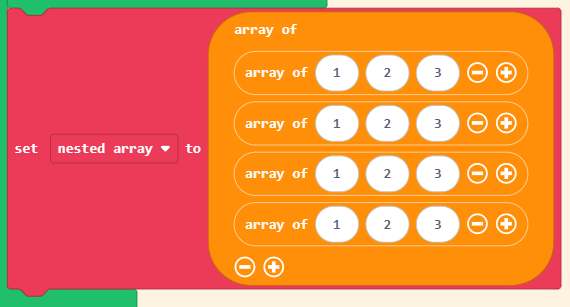
To get a value from this nested array, we can do it like this:

If you’re wondering, yes, you can put nested arrays inside of nested arrays, but if you’re working in blocks, MakeCode most of the time doesn’t really know what you’re trying to do and doesn’t allow you to run the code.
I would personally recommend avoiding nested arrays everywhere possible. Here are two ways I mostly use.
For both of those methods each of the “inside” arrays needs to have the same length!
Flattened arrays
Let’s imagine our nested array as a grid, and to get a specific point you need x and y coordinates, which will be used as the two indexes.
In a flattened array, we put all the values into one array row by row. To get a specific element, instead of doing (nested array get value at x) get value at y we do flattened array get value at (x + y * width).
It’s a little hard to explain; if you want to use this, just reply and explain your specific situation and I will help you.
Parallel arrays
Parallel arrays can work for things like items, so let’s use that as an example. Each item will be a weapon that has a name, damage, knockback, and cost.
We will make an array for each of the stats, so we will have 4 arrays.
Each item will have an ID that resembles an index in the arrays. To get the damage of a weapon with ID 4, you can simply do damage get value at ID. If you want to search by name it’s a bit annoying because you first need to save the ID by doing set ID to Names find index of "sword", but you can make a simple function for that.
Be careful; if you create an item but then don’t give it all properties, it will break the whole system and give other items incorrect stats! Each item needs to have a name, damage, knockback, and cost (or whatever arrays you create).
If you want something more advanced, I recommend using block objects if you’re willing to.
You can also encode it in a string, but I will talk about that in another tutorial.
If you have any questions or want help with your projects, ask me anything!
