FLOCKED & LOADED - Devlog

Hello there!

So uhm, you’ve probably (hopefully) seen the new game jam overtaking the forums:

Yeah….
And maybe, just maybe… you’ve heard of the upcoming GTA6, and it’s long awaited release.

So why not piggyback off of it, and make a knockoff, family friendly, pigeon-based GTA?
what could possibly go wrong?


And that brings us to our game: Flocked & Loaded!
(Apparently there’s a game titled ‘Flocked and Loaded’ on steam… but shhhhhhhh)

Alrighty. Enough yapping.
You probably wanna see some gameplay!
Hopefully.


Ver - 0.1
[Very early test]
Untitled design
(^ Really old prototype for the pigeon animation and controls)
Looks pretty ugly. Yeah. I agree.

Ver - 0.4
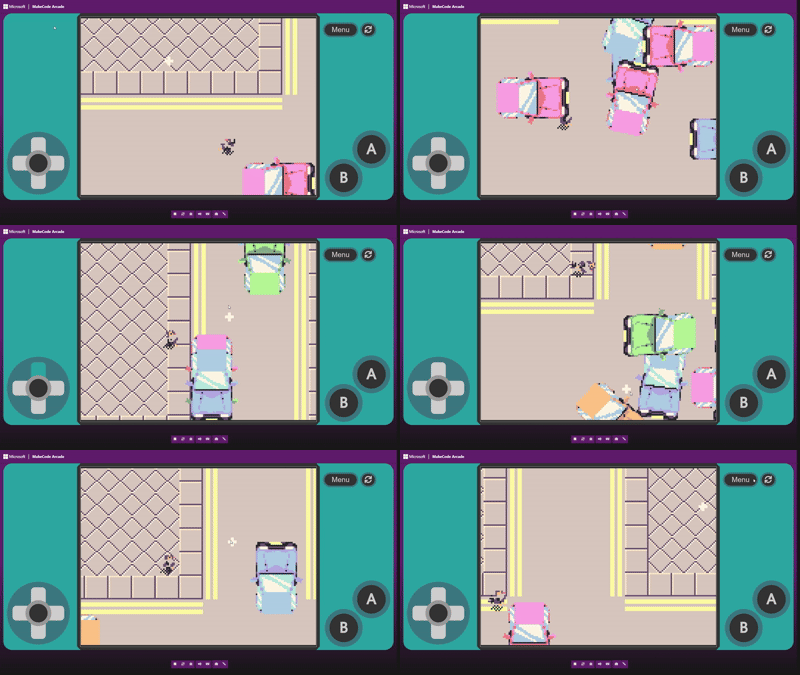
[WOW! Traffic! Sorta. And updated map as well!]
Microsoft MakeCode Arcade and 24 more pages - Personal - Microsoft_ Edge 2026-10-21 17-13-32
(^ A* Pathfinding cars that drive on the right side of the road (torn between making them drive on the left, or the right side.. or maybe down the middle :D))
They don’t really care about driving directly through each other.. :(

That’s all I have so far, and I figured you’re probably thinking ‘Wow! This person is a genius, and I really want to play this!’

Well, you’re in luck (subjectively).


And now, I’m nearing the end of my post… so I figured ‘why not end it off with some lists?’

COOL FEATURES I HAVE SO FAR (YAY :] )

  • Procedurally animated soft body pigeon!
  • A* Pathfinding cars
  • Mouse based camera and cursor

I REALLY NEED HELP WITH:

  • Making the cars not want to drive through each other
  • Make the pigeon react to getting hit by the cars…
  • (By the way, the two list points above, are a little more complex to solve than meets the eye. You’d have to look at the code to see what I mean… ;-; )
  • Using @BLADEr’s image mapping extension to make swaying tree images (I hope that’s how I can use the extension.)

Oooh, I can have polls too!

Do you think this is okay?
  • Yay
  • Nay
0 voters

And…

Should the cars drive on the right or left side of the road?
  • Right
  • Left
  • CENTER >:D
0 voters

So uh, this is the end of my post!
If you have any suggestions or help, it would be greatly appreciated.

Have a splendid day!

8 Likes

You could probably use my continuous rotation extension for the swaying trees! I created palm (but not swaying) trees in a game recently…

That was for the Sports Jam. I’m sure you could do some fancy thing with sin wave families to make little trees look like they’re swaying! or just use a thick parabola maybe?

1 Like

To use the image mapping extension I would suggest having an array of X and Y postions of the images, then having some sort of sin thing on loop to change the x (my favorite formula is sin(frequency * increasingVariable) * distance it travels) and use a for loop to create an image with the x and y positions from the array to draw the image

2 Likes

It’s not overtaking the forums, it’s just that basically everyone is participating in it, which is normal for an official game jam.

1 Like

I see you have my recording extension downloaded…

Can’t wait to see what you do with it!

4 Likes

true… it’s really just for dramatic effect, y’know?

2 Likes

ooh that’s a better idea. I never thought of that.
It’s probably easier and looks better.

If I knew how to make thick parabola though :(
I haven’t the foggiest idea as to how to go about doing that.

2 Likes

i realllyyy like that extension.
I plan on making some kinda security camera, or replay mechanic with it :slight_smile:

3 Likes

Also if you want to know how he does it he clones the screen and then save it to an array and you access it from the array

2 Likes

I’m working on an update right now. I want to make it so you can pause and resum videos

1 Like

UPDATE 0.5

Yippee another update!

So today I took @BLADEr’s (thanks btw) advice and made swaying trees with their brilliant image rotation extension.

Microsoft MakeCode Arcade and 22 more pages - Personal - Microsoft_ Edge 2026-10-24 18-42-23

How i did it (nerd explanation >:<teehee>D)

Two words.

SINE WAVE

A sine wave is a smooth oscillation, going above and below a central value.
I’m no expert on this subject, i’m just playing with blocks, but…

I have a constantly increasing variable ‘tick’, and rotate an image by using:

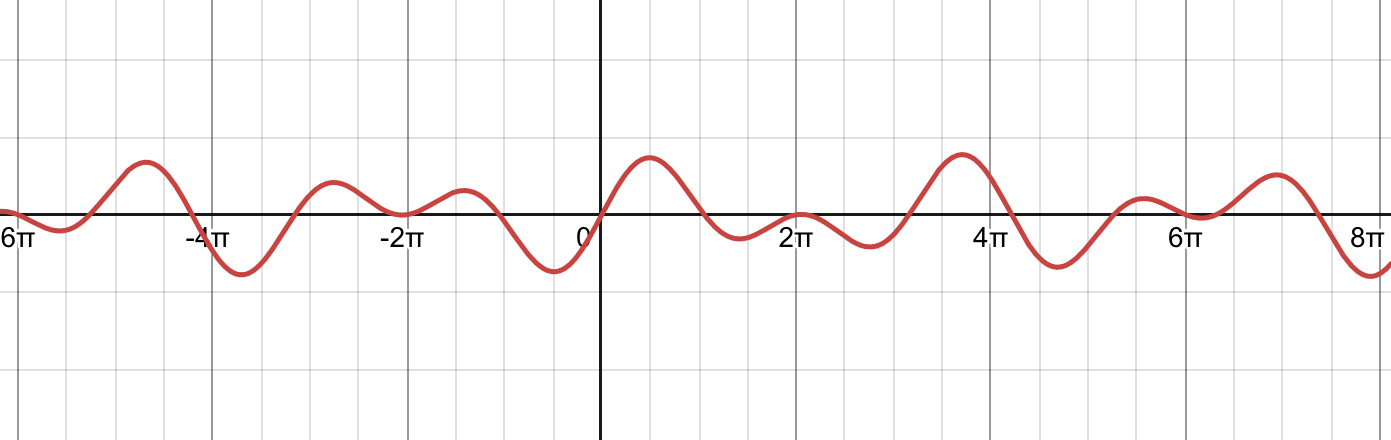
sin((tick * frequency/0.1) + treeX) * amplitude/7

But thats too predictable.
We need randomness.
We need.. a second sine wave.

We can do

sin((tick * frequency/0.1) + treeX) * amplitude/7 + sin((tick * frequency/0.3) + treeX) * amplitude/4

And get something that looks like this.

And the shadows are just Richard’s shade extension, rendering the tree as a shadow, but with a 220 degree offset.

Try it out here! :)

14 Likes

OH MY GOSHNESS!!! THESE LOOK SO GOOD! :open_mouth:

I cannot describe how happy I am that you came up with those gorgeous trees.
And their shadows add such a clean feel to your game!
I would love it if you could describe more in detail how you created the trees and create a reply in my Procedural Animation dev page!

Very Nice Job! :clap:

6 Likes

Man this is gorgeous, I can’t wait to see the final result!

3 Likes

Wait, you HAVE A RECORDING EXTENSION???

PLEASE SEND ME THE LINK!!!

3 Likes

I don’t even know what to say!

5 Likes

It might take up a lot of space so I’m gonna work on it later

1 Like

WOW TYSM!!!

I’m genuinely really flattered getting a compliment from the creator of all the procedural animation extensions.

I really need to stress that the trees wouldn’t be possible without your image rotation extension.

Needless to say, I will gladly take you up on the offer to post about the trees on the procedural animation dev page.

2 Likes

thank you so much!!

reading all these comments really make my day!
so thank you, everyone who commented on this devlog.

y’all are awesome! :smiley:

3 Likes

my take on this

1 Like


Sir I don’t think the shadow should overlay the tree

4 Likes