How to add avatar to tutorials

I’m trying to create a tutorial for my students and I’m struggling a bit. I’m trying to add an image to it but it seems not to work. I tried the following.

# Test
## Equipment
You will need
* 4.5 V battery (e.g. LR12)
* NeoPixel strip with 8 NeoPixels
* 4 cables to connect battery and NeoPixel strip
* Micro:bit with USB cable
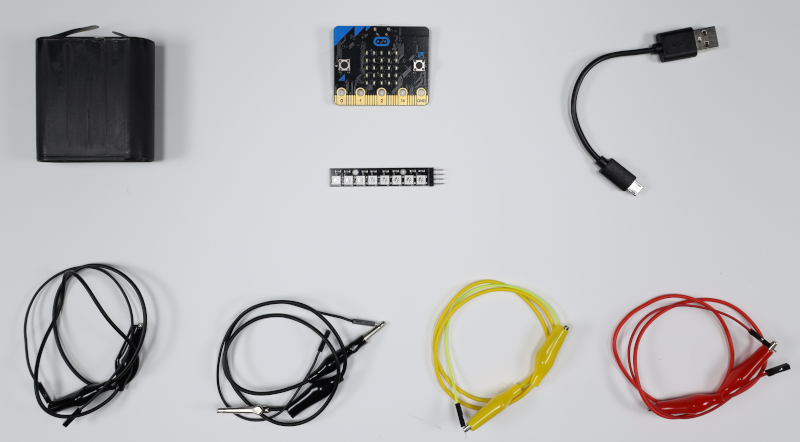
![Shows equipment from above. The four cables are red, twice black and yellow.](https://raw.githubusercontent.com/PasAlt/neopixel-tutorial/refs/heads/master/img/material.png)

~hint Pins are hard to connect to
Sometimes NeoPixel strips don't have pins that can easily be connected to.  You will have to solder that part on yourself (or ask your teacher to do it).
hint~

The image does not show up and everything after the image will not render. Here’s the my test:

Regards,
Pascal

The first image in each step is assumed to be the hint for that step. Click on the lightbulb (the “hint” button) at the bottom of the page, and you will see both the image and all of the text afterward.

To disable this behavior, you need to explicitly mark hints.

  1. Set explicit hints at the beginning of the tutorial.
    ### @explicitHints true
  2. For each step in the tutorial, explicitly mark the hint to be displayed.
    #### ~ tutorialhint
    ```blocks
    // Code for your hint goes here.
    ```
    
2 Likes