hey @richard I need help I found I had two of the vital icons project I tried to delete the older one and it did not work and things happed and both I think local copies are gone I still have the GitHub link and code but the local copies are gone plsssssssss help
so I’ve updated it
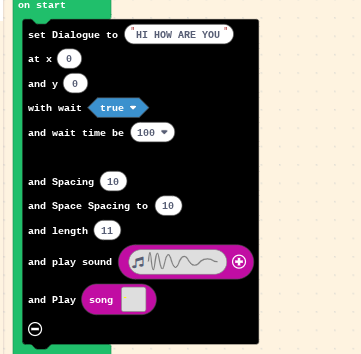
and added it where you can play a song as well with it I got so annoyed trying to get it so you can select between the two but I could not figure that out so if you just want the song set the sound volume to 0
ok I think I fixed it all the projects that I had that had the extension that I wanted had backup pngs so I just deleted them and reloaded the pngs and loaded the link to get the local copy of it back
@NeverStopTheCoder you can import github repos from the home screen. just click the import button, choose “import url”, and paste the url to the repo. or you can use the import github repo option but then you’ll have to go through a list. i usually find it easier to just import the url
yeah I did that and it worked but all the games I had for the console in Can I sell my game this way that had the vital icons extension would not load so like I said I deleted them a loaded the back ups from the saved pngs I had should that be fine and I also updated the extension (did not add anything just I guess refreshed it)
NEW EXTENSION
https://github.com/neverstopthecoder/brewing-stand-extension
MINECRAFT BREWING STAND!!
so @richard with what I said here
I did should every thing be fine because also the links of the projects deleted still worked and so did the extension link just not the local copy and when I loaded the pngs they worked the extension worked in them and I did updated the extension I just updated it without changing things so it could I guess refresh it
ok so because Ive never done a teaser before and I’m stressed about this extension stuff here is a teaser for another extension I’m making

not 100% sure i understand what you’re saying here but if it’s working fine, you’re probably okay
@richard well i guess it is but i was not really worried about the extension I was worried about the projects that had it they would not load but the links worked a and the pngs worked so I just replaced them with the pngs what I want to know is if the extension probably updated it self and that’s why the png replacements will load instead of not loading
it depends on how the extension is listed inside of pxt.json. if the entry for it has a specific version or commit hash pinned, it won’t update automatically.
if the version is “*” or “master”, then it will
@richard can you elaborate a little more like huh 
so what i think you’re saying is that you’re worried that the version of the extension that you are using is automatically updating in your project. if you added your extension via the extensions dialog, you don’t need to worry about this; the extension dialog always pins the version of the extension that you’re using so it will never auto update.
however, that might not be the case if your manually edited pxt.json. if the entry for that extension in the dependencies field doesn’t have a version, or the version is one of the special values * or master, then makecode will always fetch the latest version when opening the project.
for example, in this project arcade-mini-menu is pinned to a specific version (v0.1.0) and will never auto update:
{
    "name": "Untitled",
    "description": "",
    "dependencies": {
        "device": "*",
        "arcade-mini-menu": "github:riknoll/arcade-mini-menu#v0.1.0"
    },
    "files": [
        "main.blocks",
        "main.ts",
        "README.md",
        "assets.json"
    ],
    "preferredEditor": "tsprj"
}
but in this one, the version isn’t pinned so makecode might auto-update it when loading the project:
{
    "name": "Untitled",
    "description": "",
    "dependencies": {
        "device": "*",
        "arcade-mini-menu": "github:riknoll/arcade-mini-menu"
    },
    "files": [
        "main.blocks",
        "main.ts",
        "README.md",
        "assets.json"
    ],
    "preferredEditor": "tsprj"
}
in general, you should always pin the version! having an unpinned version can lead to weird errors
I don’t think I ever put #v0.1.0 or something along those lines the reason why I am worried is because I thought the reason I could not open the projects was because the extension was jacked up but I thought then why when I loaded the pngs or used the link it would not work I know the link saves a version of the project like every thing and so does the pngs but I thought when I loaded the pngs that maybe the extension auto updated like I wasent sure why the projects weren’t loading I asked chatgpt and it said the two local copies were being refrenced and I was wondering if when I used the URL to get a new local copy if that would update so it will use the new reference if it changes if not not is that fine I really hope that made sense
@richard heres the code I have
{
“name”: “Vital Icons Extension”,
“version”: “0.0.3”,
“description”: “”,
“dependencies”: {
“device”: “*”
},
“files”: [
“main.blocks”,
“main.ts”,
“README.md”,
“assets.json”,
“Pu.ts”,
“docs/.ts”,
“Arrange-VitalIcon-into-rows.md”
],
“testFiles”: [
“test.ts”

],
“targetVersions”: {
“target”: “4.0.14”,
“targetId”: “arcade”
},
“supportedTargets”: [
“arcade”
],
“preferredEditor”: “blocksprj”
}
and
Update Log:
May 2 2026:
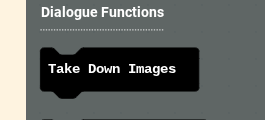
a take down block for the set image blocks because they create sprites this just kills them
May 3 2026:
so I’ve added a block

that will get the image of a Letter
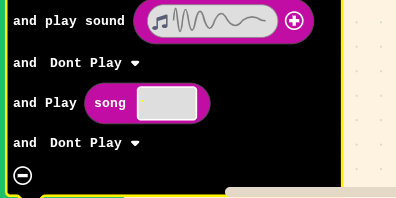
@richard ?
sorry, i really have no idea what you’re asking at this point.
Update Log:
May 4 2026:

I’ve added a Values Section with theses blocks
- 1.Get Letter Image Height at: Gets the height of the letter image at the given index
- 2.Get Letter Image Width at: Gets the width of the letter image at the given index
- 3.Get Letter at: Gets the Letter at a given index
- 4.Get Letter Image at: Gets the whole Image at a given index