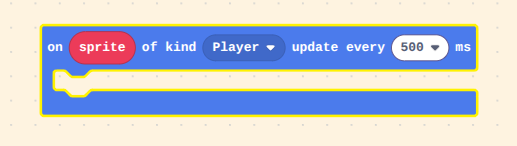
Is there a way to run code only when a sprite’s image is updated? (Without storing its previous image and checking if it has changed from that every frame)
More context on why I need that very specific block
Basically, i’m making a semi-transparent sprite where the colors of the sprite are constantly changed based on what tile is behind it. It does this by storing the original (unaltered) image of the sprite, then calculating and applying what the modified image should be to the sprite every frame.
When the rest of the code for the game changes the sprite’s image (like to make it face a new direction), I want to detect that and change the ‘unaltered’ copy of the sprite’s image, without having to add extra code. Usually I’d do this by storing the sprite’s image and checking at the end of the code if it has changed, but since the sprite changes its image’s colors every single frame, it has always changed. Even if I add a way to detect that the image change was certainly from the other code (not from applying the color change), to store the last known sprite of the image every frame, I would have to clone its image every frame and very quickly run out of storage.
I know I could just give in and add code to update the unaltered image every time the player’s image is updated, but I want to turn this into an extension, and it would be a lot more usable to just apply to a sprite and forget about rather than have to add new code to every single image-change instance!
you could probably make a function that sets the image, then recalculates the stuff to calculate. I don’t think you can, but if you could change Sprite.Prototype.setImage and/or the other image functions then you don’t have to worry about calling custom functions, but then it may not work on hardware.
That’s actually a really good question.
Considering this hasn’t been brought up ever until now, I’m pretty sure that the answer is no.
But hey, someone can take the opportunity to create a custom block for the job!
there is no prototype in makecode’s typescript! we use statically generated classes.
@randomuser as for the question for this thread, the answer is no, but it’s doable. i assume you don’t want to do this for every sprite, just some special sprites that the user designates like the player character. if that’s the case, you can create your own custom sprite by extending the sprites.ExtendableSprite class.
let’s take a look at the problem. there are two ways an image can change:
someone calls setImage() on the sprite
someone draws something new on the existing image (e.g. calls mySprite.image.setPixel(0, 0, 1))
in order to detect changes, we need to store a reference to the image somewhere so that we can compare it each frame to determine if anything changed. luckily, sprites have a nifty data field that is useful for this sort of thing.
however, we also need to detect if the pixels have changed each frame. images have a revision() function that will return an updated number every time an image is edited, so we can use that to track changes to the pixels without having to compare every pixel against some clone we keep in the background.
all put together, we get something like this:
namespace custom {
    const CACHED_IMAGE_KEY = "CACHED_IMAGE";
    const CACHED_REVISION_KEY = "CACHED_REVISION";

    class InstrumentedSprite extends sprites.ExtendableSprite {
        constructor(image: Image, kind?: number) {
            super(image, kind);

            if (image) {
                this.data[CACHED_IMAGE_KEY] = image;
                this.data[CACHED_REVISION_KEY] = image.revision();
            }
        }

        update(deltaTimeMillis: number) {
            super.update(deltaTimeMillis);
            if (
                this.image !== this.data[CACHED_IMAGE_KEY] ||
                this.image.revision() !== this.data[CACHED_REVISION_KEY]
            ) {
                this.data[CACHED_IMAGE_KEY] = this.image;
                this.data[CACHED_REVISION_KEY] = this.image.revision();
                this.fireChangeEvent();
            }
        }

        protected fireChangeEvent() {
            // handle the change here
        }
    }

    // note the return type on this function! it's very important to return
    // type Sprite and not InstrumentedSprite or else you'll cause variable
    // type errors when people try to use your sprite with other sprite blocks
    export function createSprite(image: Image, kind: number): Sprite {
        return new InstrumentedSprite(image, kind);
    }
}
and you would turn the createSprite function into a block in your extension
right, you could also use shader functions to do this. i don’t totally have a clear picture of what @randomuser’s end goal is here, but assuming that the desire is to make some sprite that sort of fades into the background like a chameleon, you could instead override the draw method in sprites.ExtendableSprite and shade based on the pixels in the image instead of drawing the image to the screen.
the downside with that approach is that the shading functions don’t handle scaling or rotation so you’d have to either not support those features or do it custom which would be both annoying and performance intensive.
After rereading it I think Random’s implementation would be less complicated if she didn’t have to learn how to use the shader functions, but idk, depends on what the end goal is. Simply darkening the colors on a ramp doesn’t seem like the end goal.
Wow, thank you both for the amazing responses, this is PERFECT!!! (Not in the way I originally intended, but in a new way?)
Just using @richard 's code does almost exactly what I asked for-- it fires every time the sprite’s image is changed! However, it only fires once that new image is rendered to the screen. So instead of intercepting the set image block so I can change the base image before it is rendered, the code just fires at the start of each frame, meaning there is no way to tell if the image change was from a user’s code or the expected transparency updates.
I thought then that I would try overriding the draw method or learning how to use shaders, but I was really focused on the fact that the sprite’s image could store data (which I hadn’t known previously).
So, I kept just the image data part of Richard’s code. Anywhere the transparency extension updated the sprite’s image, it would override the cached image keys, preventing the image-changed code from firing. So now the code only fires when the image is manually updated, and can integrate into existing code much better!
Here’s the link by the way: (I’ll likely post it as an extension as well, once I add more features, and fix that dragging effect)
If you wanted to use this in a project would I take up less memory to make it by using the extension as a template but fixing it so it only works on certain things which might take up less space or just use the extension normally
I get your point up until ‘certain things’; if you mean certain sprites, the code only runs for sprites made to be transparent so that isn’t an issue. Is there some other thing you’re talking about?
 (Not in the way I originally intended, but in a new way?)