I’m working on an extension, and I’m wondering what //%blockID is and what does it do. (@richard I’m mostly asking you but anyone else who knows too)
1 Like
Also @richard how can I create a block like the Menu item in your Mini Menu Extension?
1 Like
blockId is used internally by makecode. every block needs to have a unique block id
as for the second question, can you be more specific? what feature are you looking to copy?
1 Like
well then why does every block have to have a block id like every one of my extensions i dont think i put //%blockId on them
2 Likes
I essentially want to have an array of “slope tiles”
I want to make each “slope” a block like this:

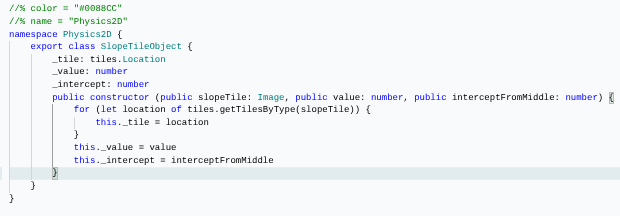
But make it have a tile select, number input, and number input. How can I make it becomes a block if my code looks like this:
1 Like
@richard ok i’ve figured this out but for some reason this is causing an error and I can’t figure out why. Please help:
you’re never assigning your slopelist object.
also, you probably need to set a tilemap before calling activateSlopeTiles
Okay, how can I assign it exactly? (sry I’m not very experienced with extension making)
when you declare the variable here:
let slopeList: SlopeTileList = null
you need to assign it to an instance of the class like so:
let slopeList: SlopeTileList = new SlopeTileList([])
1 Like
Ah ok thank you! Does this mean that the sprite.create() function essentially creates a new Sprite class?
yup, the code for that is right here:
how do classes work along with the new thing because I would just proably use = null or something
can you explain what you mean by the new thing? not sure what you’re getting at here
the command “new” i never use that along with “class”
i’m not going to go into an in depth explanation here of classes and the new keyword, but the only way to create an instance of a class in makecode is to use new.
you can think of null as something of a placeholder value, like saying “i’ll get to assigning this variable later”, but if you ever want to actually use the variable then you’ll need to create an instance of the class with new.
even if you call a function that returns an instance of the class, like sprites.create that function is using new somewhere.
1 Like
Is there a way to create a custom editor for makecode? like essentially a custom tilemap editor but with three views that would add on to the original engine. (I don’t care how complex or how many files and stuff we need)
thank you 
@richard I’m mostly asking you here but where is the code for any of the editors (image, animation, tilemap, music, sound)? I’ve looked through almost all the folders and files in the GitHub repository but can’t seem to find anything. I just want to see the code that sets up the tilemap editor so I can make essentially a clone.
unfortunately, that’s not something you can do from an extension. those editors are part of the core of makecode, which lives in https://github.com/microsoft/pxt
can you give some details as to what you’re trying to do? how would your editor be different?
I want to help @Existent_Chicken with his 3d thing extension, and we essentially want to make a multiview tilemap editor, like Portal 2’s Hammer World Builder.
It would look somewhat like this:

(sorry for my terrible editing skills)
Anyway, you’d essentially have 3 tilemap editors, and one read only isometric view of the 3d tilemap you’ve created.